Nothing to host
Fully managed. No storage buckets, no diff workers, no 2am pager. Add a token to CI and you're live.
Visual regression testing for teams shipping with AI agents
You review the logic in the diff. Nobody reviews the pixels — until a 4px button shift and a wrong shade of green land in production. pixmoat catches every screenshot, on every viewport, on every PR your agent opens.
Free plan, no card.
Building with a team? Start with Pro€15/seat, 25,000 shots a month.
Read the Playwright setupSee the merge request guideMachine-readable docs
Inspect every change your way — wipe, blink, or highlight the exact pixels that moved. Drag the handle or pick a mode.
No new dashboard to babysit. pixmoat runs inside your existing Playwright suite, uploads on every build, and fails the check with a link straight to the review. Your agent reads the summary; you make the call.
$ npx playwright test
  ✓ dashboard renders            1.2s
  ✓ settings page                0.8s
  pixmoat › uploading 24 screenshots… done
  pixmoat › 23 match baseline · 1 changed

  ✗ dashboard.png  — 412 px moved (2.3%)
      “Save” button shifted 4px down
      success green  #22c55e → #16a34a
      review → app.pixmoat.com/review/9f2a

✖ 1 visual change needs a humanEvery shot lands next to its approved baseline. Wipe, blink, or highlight the exact pixels that changed. Approve the intended stuff, reject the regression, and the status flows straight back to the MR.
See a real review →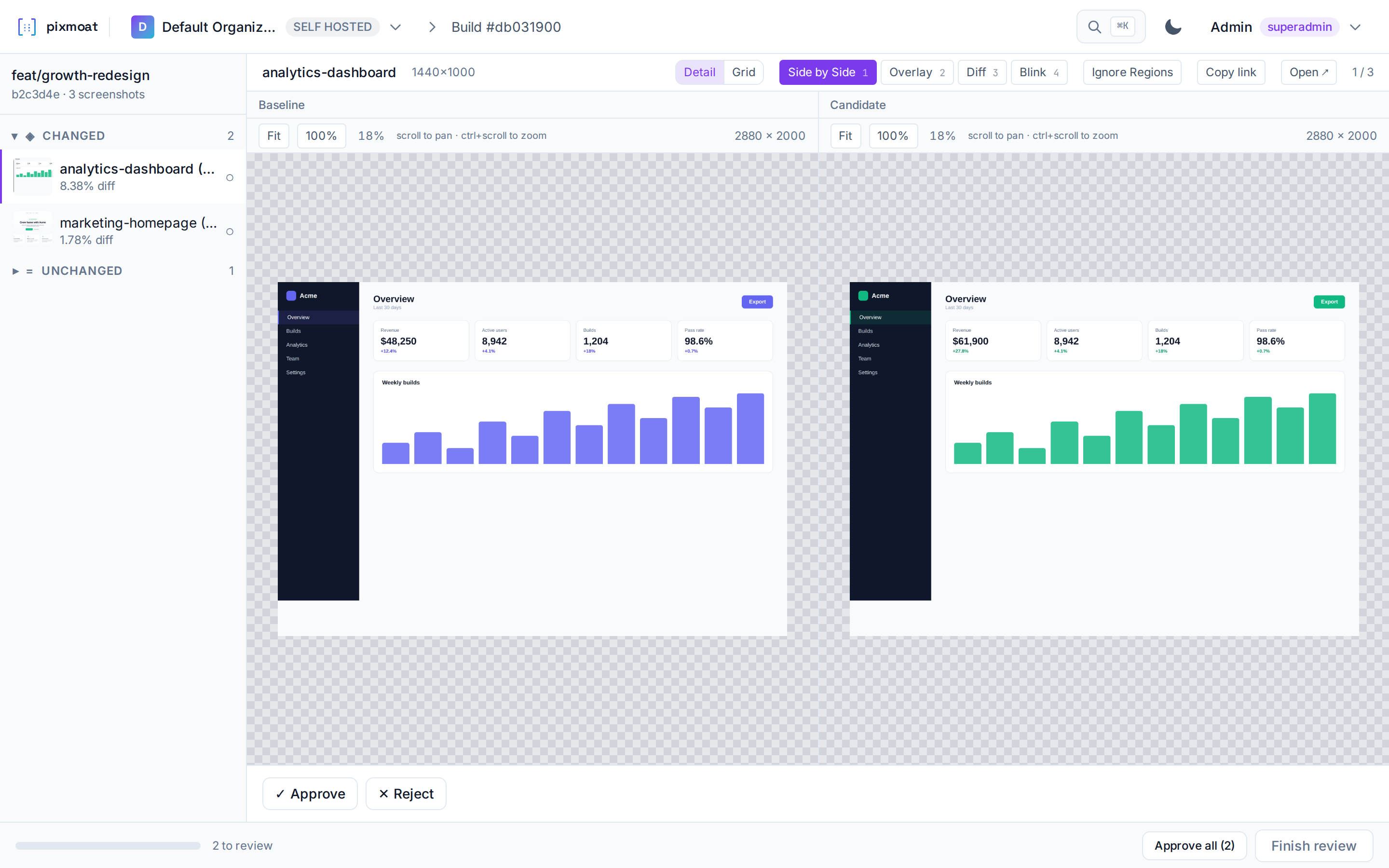
Compact, structured summaries — not a screenshot dump. Claude Code, Cursor, and the rest get "button moved 4px, color drifted," decide whether it's intentional, and either fix it or ask you.
Refactored the settings layout. All tests green — merging.
Hold on — settings.png changed 2.3%. Toggle row shifted 6px, contrast on the label dropped below AA. Intentional?
Not intentional. Reverting the padding change and re-running.
Fully managed. No storage buckets, no diff workers, no 2am pager. Add a token to CI and you're live.
Desktop, tablet, mobile in one run.
Tune out the noise, keep the signal.
Animations are frozen and fonts finish loading before each capture, and masked regions stay out of the diff, so a rogue cursor blink never blocks a merge.
Catch new contrast and WCAG violations beside the visual diff.
Track LCP, CLS, INP, and payload size to catch performance regressions before they reach users.
Baseline browser errors, warnings, and failed requests before they reach users.
Required approvals and CODEOWNERS routing put the right human on the right change.
Build results appear as a commit status on GitLab and Bitbucket, or on any other host through a configurable status request. GitHub Actions can upload screenshots. GitHub status checks are not available yet.
The Playwright client snaps your screens during the suite you already run, and uploads on every CI build.
pixmoat diffs each shot against the approved baseline and flags exactly what moved — down to the pixel.
Approve the intended change or reject the regression. Approved shots quietly become the new baseline.
Pricing
Start free, then give every Pro seat 25,000 screenshots per month for agent-heavy CI.
Everything you need to put visual review into your workflow.
Annual billing: €150/seat/year — 2 months free.
More capacity and retention for teams and coding agents running visual checks continuously.
FAQ
No. pixmoat is fully hosted. You add a project token to your CI and upload screenshots — there are no servers, database, or storage for you to run or maintain.
Every screenshot is compared against the approved baseline for its branch. pixmoat highlights exactly what changed with an adjustable threshold, so anti-aliasing noise does not create false positives. You approve intended changes or reject regressions right in the review UI.
Capture with Playwright today, and upload from any pipeline. GitLab CI/CD shows the result on the merge request as a commit status. GitHub Actions can upload screenshots. GitHub status checks are not available yet. Cypress and Selenium support are on the way — tell us what you use and we will prioritise it.
Yes. Screenshots are scoped to your project and protected by per-project access tokens. Only members you invite can view or review them.
Not yet. Agents can already read a build's change summary, and an MCP server for Claude Code, Cursor, and Codex is on the way. Visual changes are reviewed in the web app today.
Start with the free plan with no credit card. Pro is €15 per seat per month and includes 25,000 screenshots per seat per month. Annual billing is available; see the pricing cards above for current limits and retention.
Each image can be up to 20 MiB. Very wide or very tall screenshots are scaled down before they are stored, and an image with too many pixels to compare is rejected, so capture long pages at device scale 1 or split them. These safeguards are separate from your monthly screenshot allowance.
Connect your first project in the time it takes to grab a coffee — free, or poke around the live demo first.
Or go straight to Pro for your team.