pixmoat / field notes / Implementation
Visual regression testing in GitLab CI: a practical guide
GitLab CI can run your Playwright tests successfully while a visual regression is still waiting somewhere nobody checks. The screenshot was captured, the job produced an artifact, and the pipeline turned green—but the changed button, broken mobile layout, or shifted navigation never received a decision.
That gap is the hard part of visual regression testing in GitLab CI. A useful integration needs more than a screenshot command. It needs stable capture conditions, protected credentials, a review link that survives a failed job, artifacts that GitLab can understand, and a clear policy for when a visual change blocks a merge. This guide lays out that workflow, starting with a report-only rollout and ending with an intentional merge gate.
Start with the CI contract
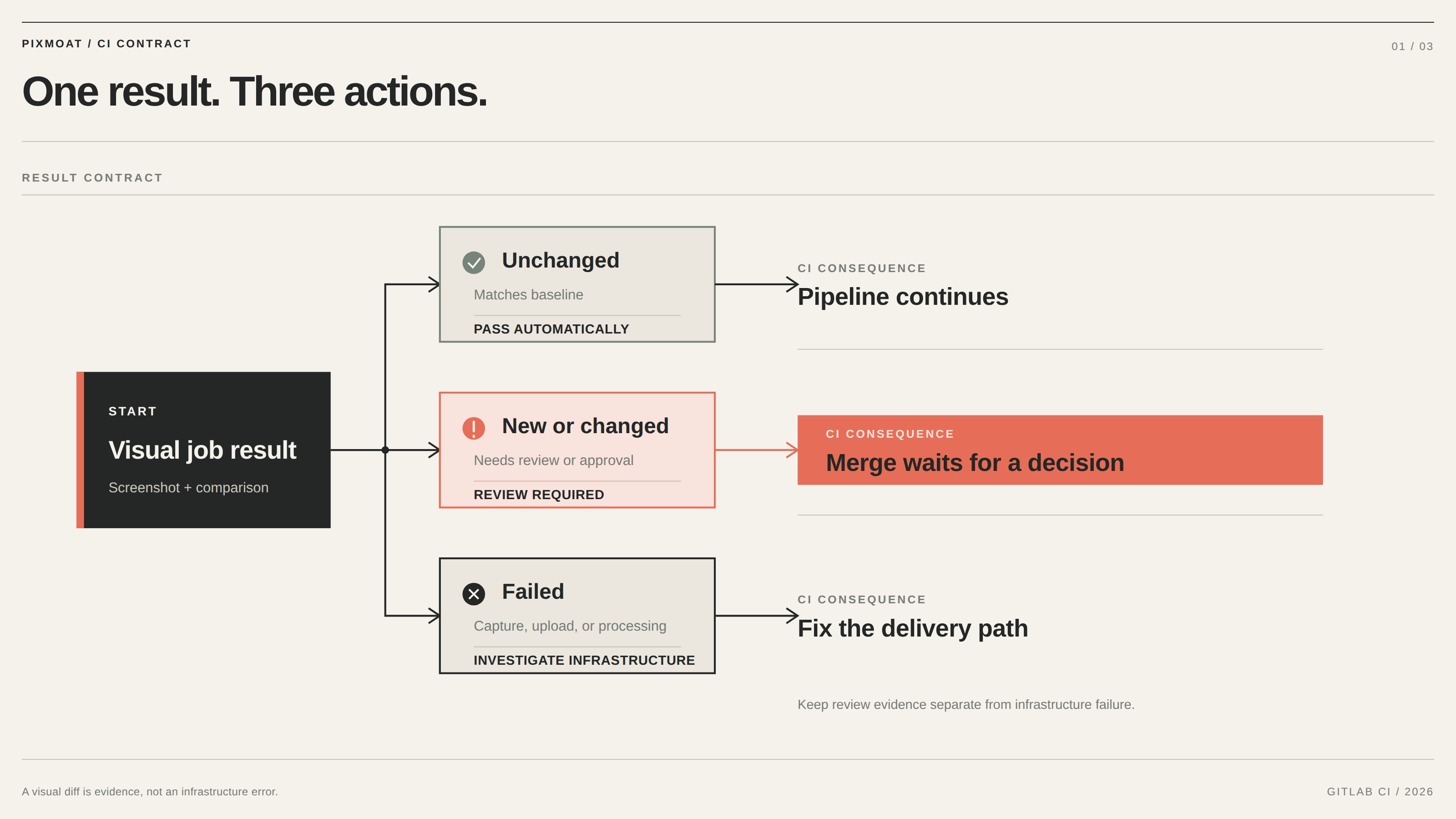
Before adding a job, decide what the pipeline should mean when a screenshot changes. There are three different outcomes to keep distinct:
- Unchanged: the candidate matches its baseline and can pass automatically.
- New or changed: a person needs to inspect the result, or an explicitly authorized workflow must approve it.
- Failed: capture, upload, or processing did not complete reliably.
Do not collapse all three into a generic test failure. A visual diff is evidence for review; an upload error is an infrastructure problem. Your GitLab configuration should preserve enough information to tell them apart.
The other part of the contract is snapshot identity. A name such as dashboard is not sufficient when the same page runs at desktop and mobile sizes or in more than one browser. Pass the branch and commit identity from GitLab, and keep the viewport and browser configuration stable. Otherwise, a valid layout change can look like a baseline mix-up.
Finally, decide which files can affect rendered UI. GitLab’s rules: changes: can skip visual work for backend-only changes. That saves runner time and avoids making an unrelated merge wait for a review that cannot contain a meaningful visual result.
Prepare the Playwright job
The documented Pixmoat integration is Playwright-first and uses the existing Playwright runner. Install @s4labs/pixmoat-playwright, create a project, and store its project access token as a masked GitLab CI/CD variable named PIXMOAT_TOKEN. The Playwright integration guide covers both the fixture API and the reporter; the reporter is the lower-friction option when your suite already uses toHaveScreenshot().
The visual job needs four required values: PIXMOAT_PROJECT, PIXMOAT_TOKEN, PIXMOAT_BRANCH, and PIXMOAT_COMMIT. In GitLab, map the last two to the branch and full SHA available in the pipeline. Add PIXMOAT_URL when you want to target a particular hosted or self-hosted instance, and pass PIXMOAT_CI_URL as the pipeline or job URL so the review can link back to GitLab. For merge-request baseline branching, set PIXMOAT_PR to CI_MERGE_REQUEST_IID.
Use a Playwright image that contains the browser dependencies, run npm ci, install the required browser if the image does not already provide it, and invoke Playwright with @s4labs/pixmoat-playwright/reporter. Keep your existing reporters if you use them; the Pixmoat reporter adds the visual upload and CI report outputs rather than replacing your test runner.
Publish artifacts that reviewers can use
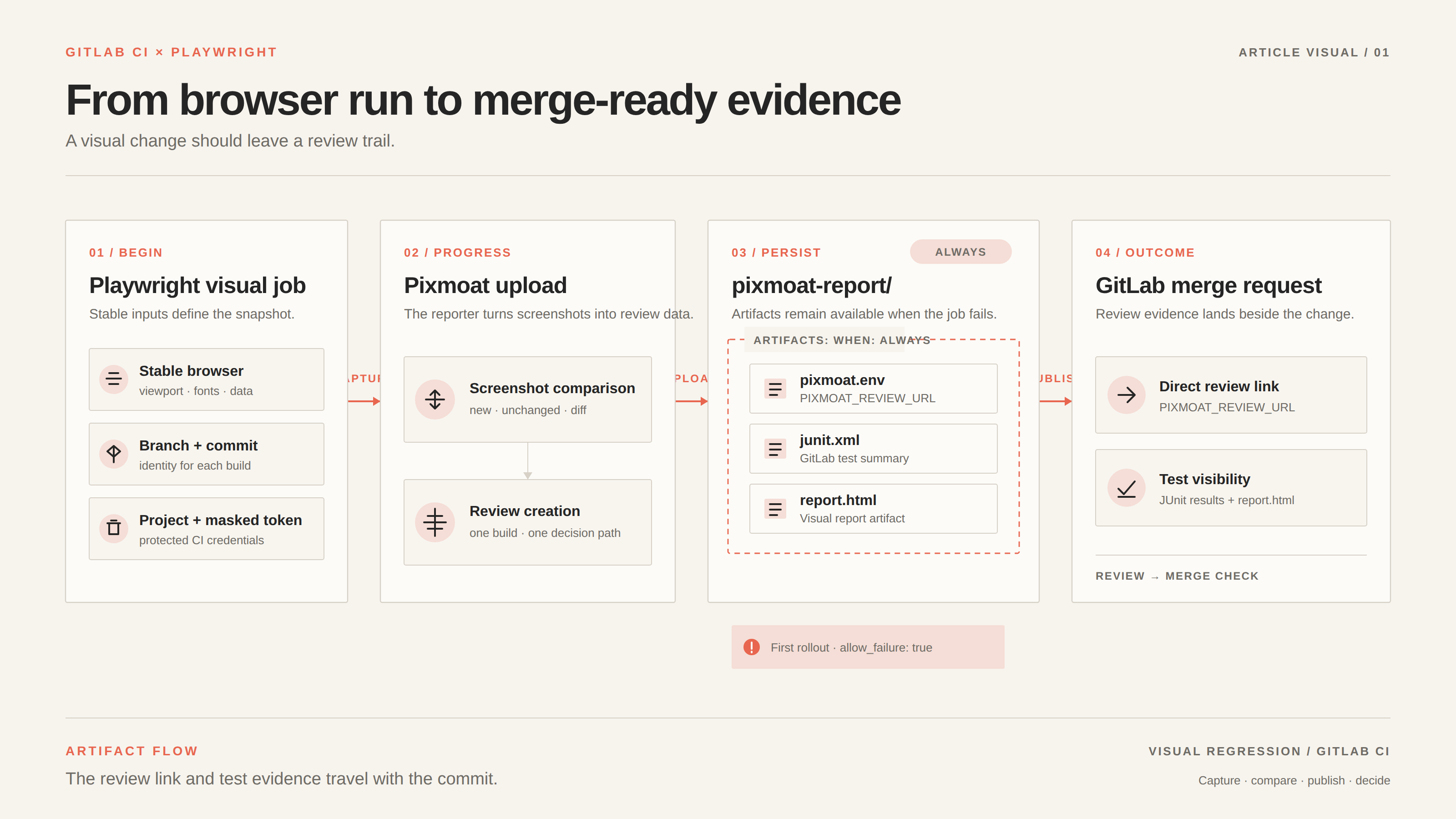
Make the job’s artifacts upload with when: always. A visual job often fails precisely when the reviewer needs its output. The reporter writes three useful files under pixmoat-report/:
pixmoat.envis a GitLab dotenv report containingPIXMOAT_REVIEW_URL. Use it as the URL for a visual environment so the merge request gets a direct “View app” link to the review page.junit.xmlfeeds GitLab’s merge-request test summary with per-screenshot results when available.report.htmlis a self-contained summary that can be exposed as a named “Visual report” artifact.
Retain the report directory as a normal artifact as well. A concise review link is more valuable than asking a platform owner to search through job logs for a build ID.
For the first rollout, set the visual job to allow_failure: true. This is a temporary adoption mode, not a quality policy: establish baselines, confirm the review link, and make one controlled change before you let the result block delivery. The merge request guide explains where the review result appears and what happens after approval.
Prove the integration with three runs
Use one deterministic route and one browser first. For example, capture a checkout form after its test data and fonts are ready, then run this sequence:
- Run the visual job against a branch with no baseline. The screenshot should be reported as
newand should appear in the review flow. - Run the same commit and page again without changing the rendered UI. The result should be
unchanged. - Make one deliberate CSS change, such as increasing the checkout button’s padding, and run the job again. The result should be
diff, with a review URL and a visible changed region.
This test is reproducible because each run has a known purpose. If the second run is already a diff, fix readiness first: freeze dynamic data, wait for the relevant UI state, make fonts and assets available, or mask content that is not under test. Increasing a global tolerance is a poor substitute for deterministic capture because it can hide a real layout shift.
After the controlled diff, approve it if the change is intentional or reject it and restore the CSS. Run the page once more to confirm that the result matches the decision. This small loop verifies the complete path: capture, upload, comparison, review, and CI visibility.
Choose how GitLab should block merges
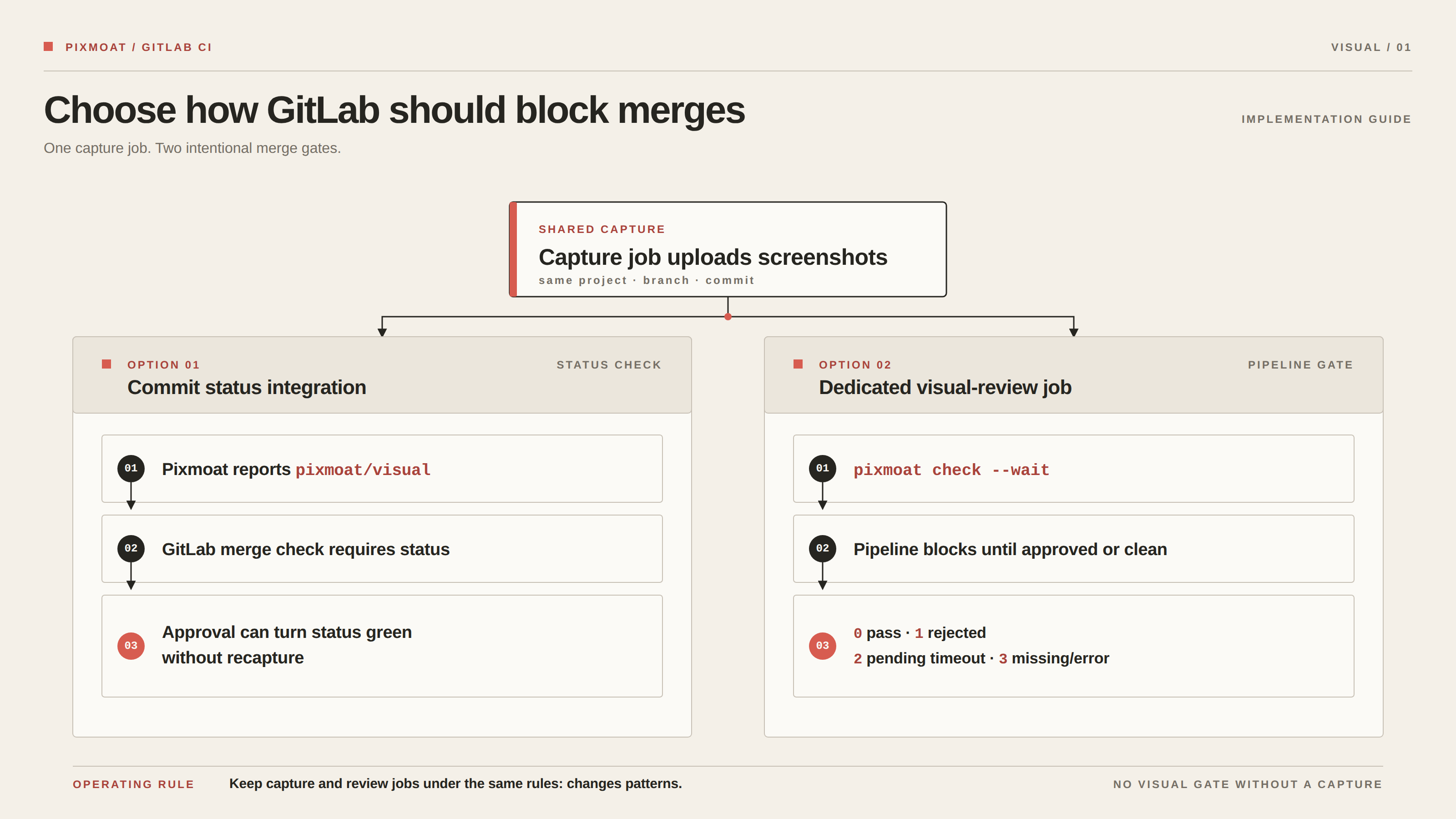
Once the signal is trustworthy, choose the gate that fits your GitLab edition and team workflow.
The smoothest option is Pixmoat’s GitLab commit status integration. Configure the GitLab URL, project path or ID, and a GitLab token with api access in the Pixmoat project settings. Pixmoat reports a pixmoat/visual status for the commit. A build with blocking visual changes is failed; after a reviewer approves the change in Pixmoat, the status can turn green without rerunning the capture job. GitLab can require that status under its merge checks.
If your GitLab setup relies on “pipelines must succeed” or cannot use external status checks as a merge gate, use a separate review job. The capture job uploads the screenshots. A following job runs pixmoat check --wait with the same project, branch, commit, and token values. Its deterministic exit codes are 0 for an approved or clean build, 1 for a rejected build, 2 when the review remains pending until timeout, and 3 when the build is missing or an error occurred. Pending review therefore remains visible as a non-passing pipeline instead of silently merging.
Keep capture and review jobs under the same rules: changes: patterns. A backend-only merge request should not create a visual gate with no corresponding build. The merge-request integration guide shows both the commit-status approach and the dedicated visual-review job, including the retry flow for GitLab Free.
Handle branches, retries, and merges deliberately
A retry should not create an accidental second source of truth. Pixmoat reuses the existing build for the same project, branch, and commit SHA when a CI job is retried, so the comparison can be repeated after a transient runner or upload failure. Keep that identity consistent between local runs and GitLab runs.
Branch baselines also need an explicit promotion rule. An approved feature-branch screenshot is not automatically the default-branch baseline merely because it passed review. Configure the GitLab merge-request webhook when you want approved baselines promoted after the merge. Pixmoat checks that the target baseline has not changed since the review; if another merge changed it first, the promotion is skipped so newer work is not silently overwritten. Redelivered merge events are handled idempotently.
Protect the project token like any other CI credential: mask it, limit its scope to the project, and avoid printing it in scripts or debug output. Keep visual reports available on failure, and monitor the job’s upload and review links as part of the platform support path.
Where Pixmoat fits
Pixmoat is a hosted visual regression workflow for Playwright teams. In v1 it is Playwright-only, and its comparison is deterministic pixel comparison—not AI-powered diffing. It accepts screenshots from the Playwright capture client, keeps branch-aware baselines, groups and displays changed regions, and returns review state to CI through GitLab reports, commit statuses, or the CLI.
It does not make an unstable page deterministic, decide whether a redesign is good, or replace functional assertions. Your suite still owns test data, readiness checks, browser coverage, and the choice of which UI changes are intentional. If you need a different test runner or a tool built around another component workflow, validate that fit before adopting a Playwright-only integration.
The right first milestone is modest: one route, one stable browser configuration, one masked token, and one reviewable GitLab job. Follow the Using pixmoat guide, verify the new → unchanged → diff loop, and only then turn visual review into a required merge check.