pixmoat / field notes / Solution-aware
Rolling out visual regression testing without blocking every merge
Visual regression testing is easy to postpone and hard to introduce. The first time a screenshot check reports a difference, the team has to decide whether it found a real regression, an intentional design change, an unstable capture, or a test that should not have run at all. If every difference blocks the merge immediately, developers learn to distrust the check. If nothing blocks, the check becomes another report that everyone ignores.
The practical answer is a staged rollout: collect evidence without making it a universal gate, stabilize captures, establish a review habit, and then block only the projects that have earned that trust. This guide lays out that process for a frontend team using Playwright.
Why visual checks create merge friction
Pixel comparison is deliberately literal. It can tell you that the candidate image differs from the baseline, but not whether the difference was a planned redesign or a broken margin. The comparison is also downstream of the test environment: late fonts, changing data, animations, timestamps, viewport differences, and browser rendering can all change the captured pixels.
That creates three different failure modes:
| Failure mode | What the team experiences | The right response |
|---|---|---|
| Unstable capture | The same code produces different screenshots | Fix readiness, data, fonts, animation, or masking before changing tolerance |
| Unreviewed intentional change | A valid redesign appears as a red build | Review it, record the decision, and update the baseline deliberately |
| Unscoped gate | Backend-only work waits for an irrelevant visual review | Run the visual job only for UI-relevant changes |
Treating all three as “the visual test failed” is how a useful quality signal becomes a bottleneck. A rollout needs a policy for each one before it needs a stricter threshold.
A staged rollout that preserves delivery speed
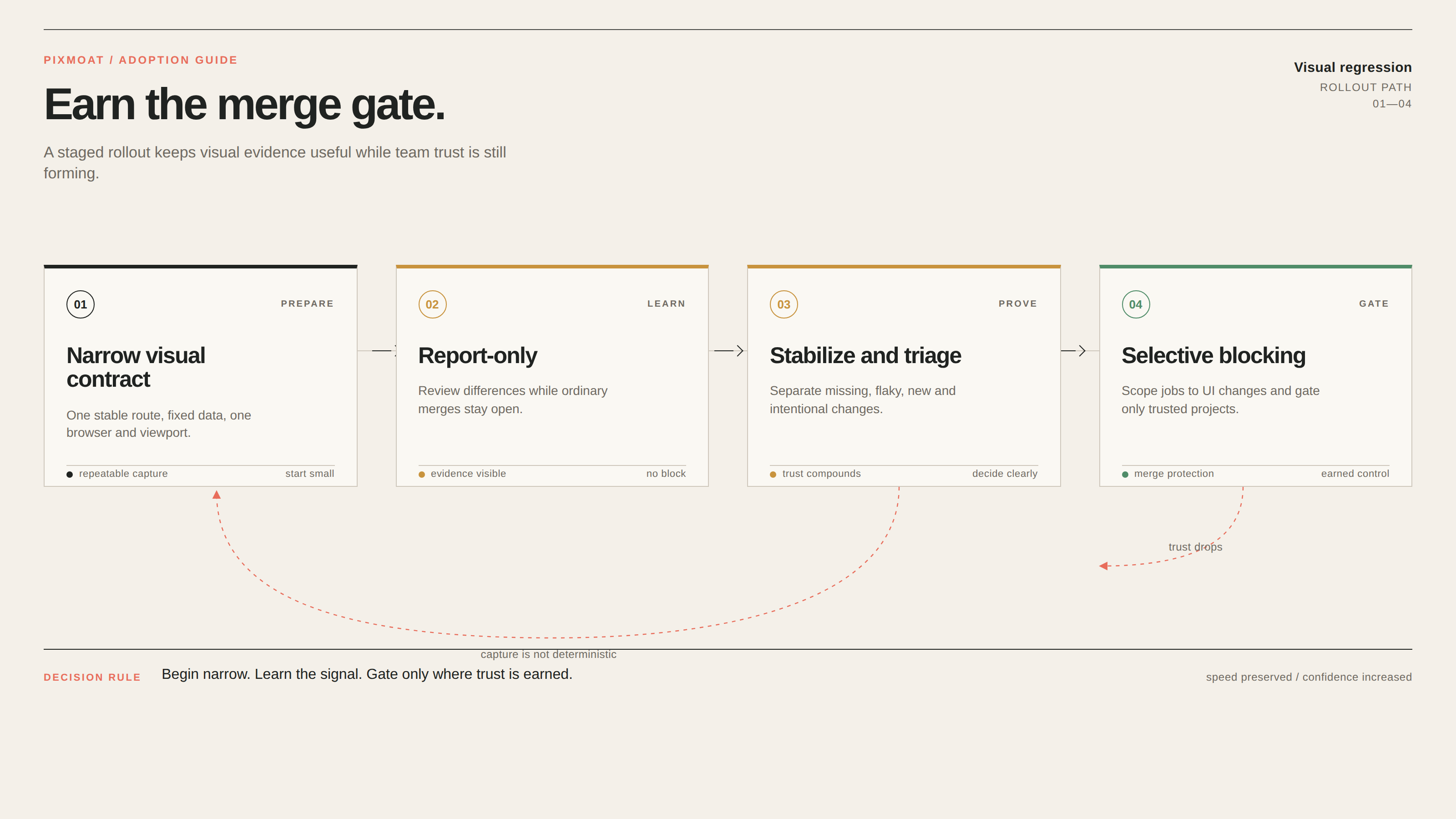
1. Start with a narrow visual contract
Choose one user-important route or component that the team can make deterministic. Keep the first matrix small: one browser, one viewport, and known data. Expand after the first route produces repeatable results.
Before capturing, make the page ready on purpose. Seed or mock data, wait for a user-visible ready state, load the same fonts and assets, and freeze or disable animations where appropriate. Mask only content that is genuinely irrelevant, such as a timestamp or rotating avatar. A large mask can make the build green while hiding the regression you wanted to catch.
The first milestone is one screenshot that means the same thing on every run.
2. Run report-only while the team learns the signal
For the initial rollout, visual differences should be visible and reviewable without blocking ordinary merges. This gives the team time to discover missing baselines, skipped screenshots, dynamic regions, and naming mistakes.
Report-only should be temporary and explicit. Decide who reviews results, how often, and what counts as a fix rather than an approval. A useful record answers what changed, why, which snapshot and viewport were affected, and whether the baseline should move.
Do not approve everything automatically. Review a representative set of unchanged runs, new snapshots, and deliberate UI changes so the team learns which evidence is trustworthy.
3. Separate capture problems from product changes
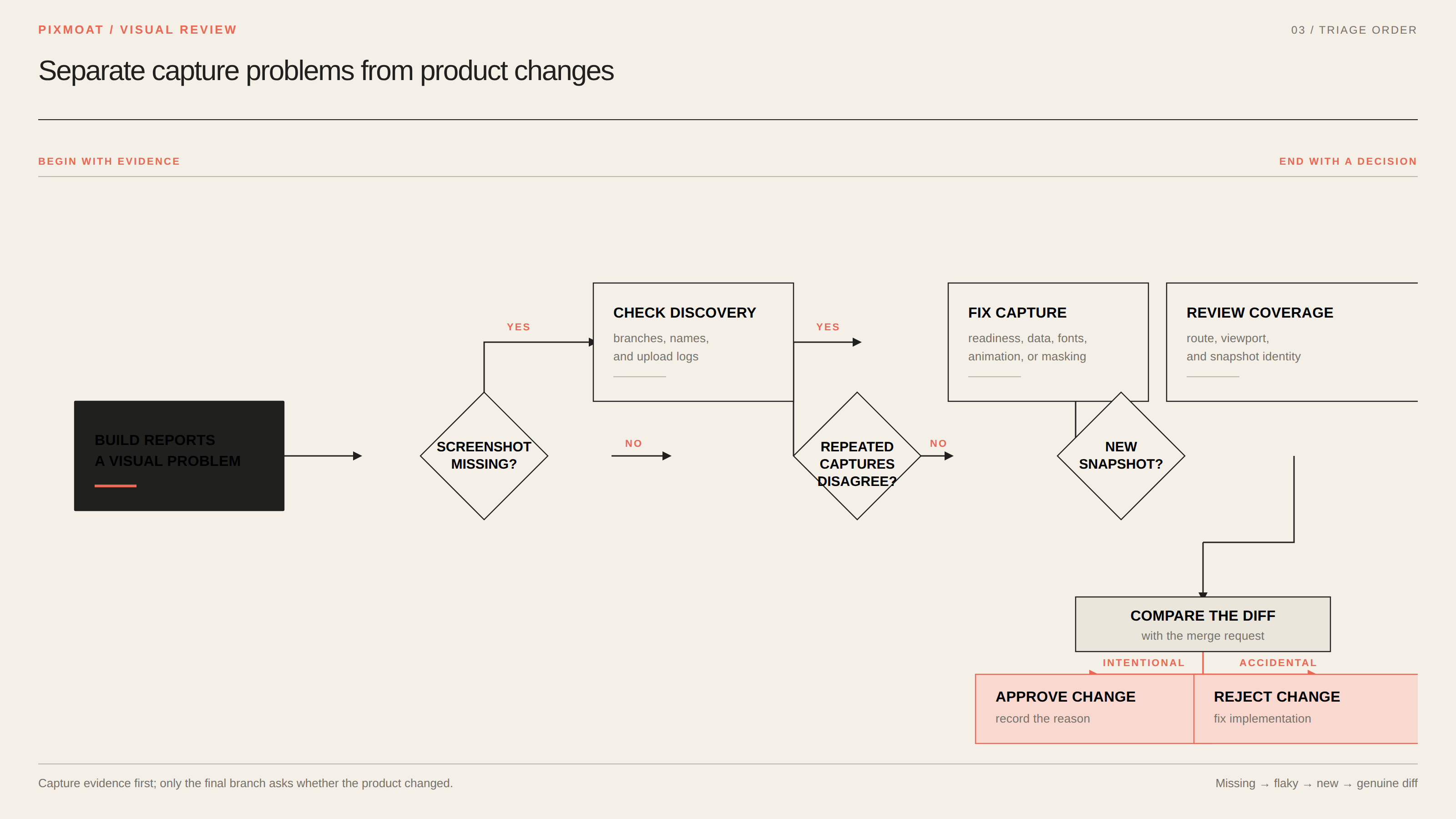
Use a consistent triage order for each build:
- Resolve missing screenshots. Check test discovery, conditional branches, snapshot names, and upload logs.
- Investigate flaky captures. Repeat the same state and fix instability before adjusting tolerance.
- Review new snapshots as coverage decisions. Confirm that the route, viewport, and snapshot identity are intentional.
- Review genuine diffs against the merge request. Approve planned changes and reject accidental or incomplete ones with a specific comment.
This order matters because a baseline cannot make an unstable observation reliable. If repeated captures disagree, the page is not ready for a product decision. Quarantine can contain a flaky snapshot, but it is not proof that the underlying problem is solved.
4. Make the gate selective
Once the signal is stable, choose where blocking is appropriate. The visual check should run when UI-relevant files change: components, styles, templates, and visual test code. Backend-only changes should not create an irrelevant visual review.
Then choose the smallest useful gate. A team might block its design system and checkout flow first, while leaving less mature projects in report-only mode. It might block the visual job itself, or use a commit status that becomes green after approval. “Blocking” should be an intentional policy, not a default reaction to every red pixel.
For a team using GitLab, the documented integration supports a report link, JUnit results, and a downloadable HTML report in the merge request. A project can require the visual status as a merge check, or use a dedicated review job that waits for approval. Use path rules so both the capture and review jobs are skipped for backend-only changes. The GitLab merge-request integration guide describes these alternatives, including the retry loop for job-based gates.
A reproducible three-run example
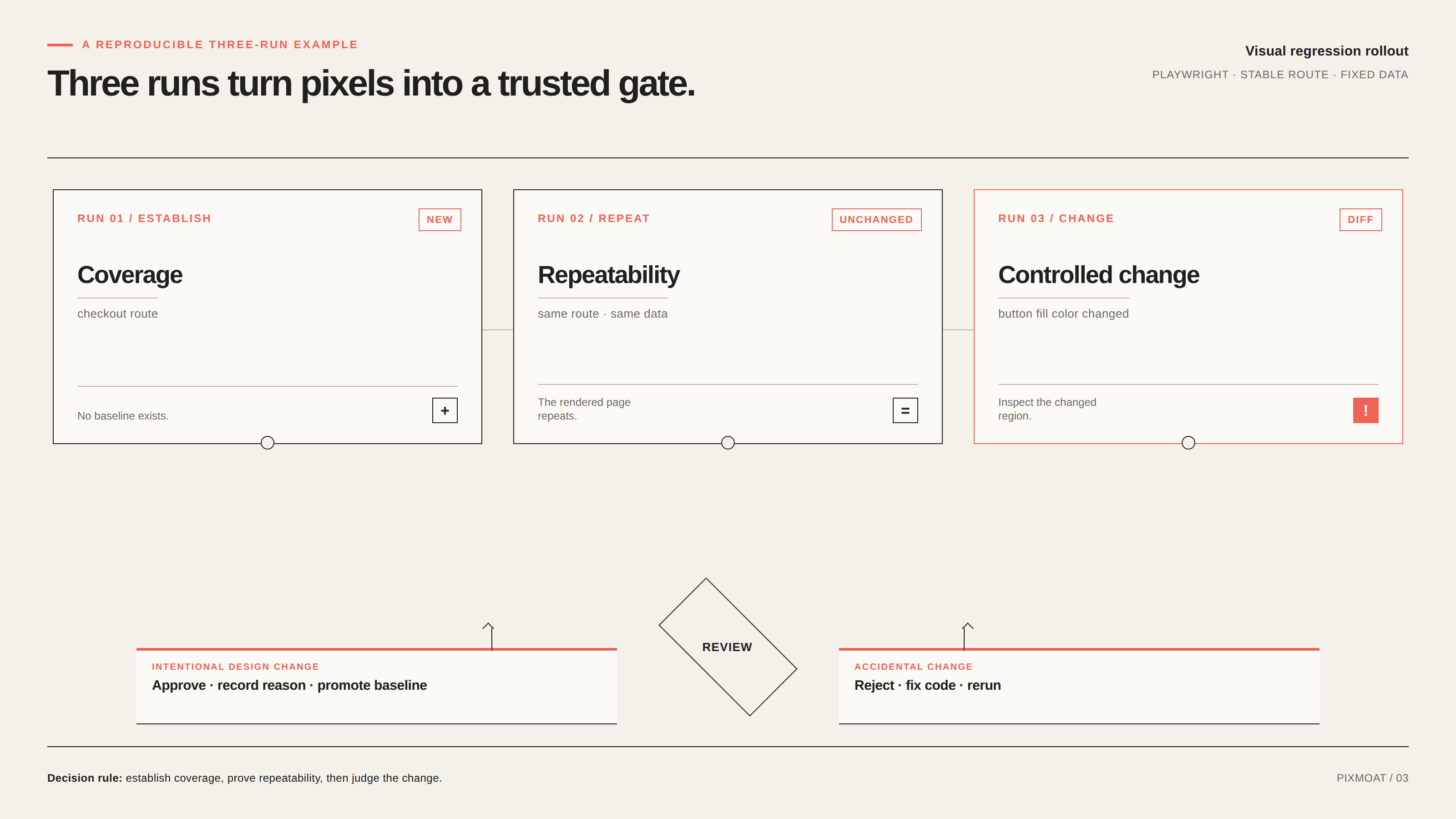
Take an existing Playwright test with a stable route and fixed data. If it already uses await expect(page).toHaveScreenshot("checkout.png"), keep the test as it is and run it through the visual reporter. The first run has no baseline, so it should be treated as a new snapshot and reviewed as a coverage decision.
Now run the same commit again without changing the rendered page. The expected result is unchanged; there is no visual decision to make. This is the baseline for trust: the capture repeats.
Finally, make one controlled UI change, such as changing the checkout button’s fill color, and run the test again. The expected result is diff. Inspect the changed region and compare it with the code change. If the color update is the intended design change, approve it and record why. If the code change was accidental, reject it and fix the implementation. Run the test once more after the decision to confirm the result matches the approved baseline.
This sequence exercises the decisions a team needs in production: establish coverage, recognize a clean repeat, and distinguish an intentional change from a regression. The Playwright integration guide documents both the reporter and fixture API.
Keep baseline changes explainable
Visual testing becomes safer when a baseline is treated as a versioned quality decision rather than an image file that can be replaced. Keep snapshot identity stable: test or route name, viewport, browser, and device pixel ratio should describe the image. Review intentional changes alongside the merge request that caused them.
Branching needs the same discipline. A feature branch may inspect its candidate against a branch-scoped baseline while the default branch remains the long-lived source of truth. When parallel work changes the same snapshot, check that the promoted baseline is still current rather than overwriting a teammate’s decision.
If the policy should travel with the repository, a .pixmoat.yaml file can keep settings such as blocking_mode, tolerance, viewports, browsers, and flakiness thresholds reviewable in Git. Build-scoped settings are evaluated for each build; project-global settings such as retention and agent approval mode are applied from the default branch. The project configuration guide explains that distinction and provides validation commands.
Where Pixmoat fits
Pixmoat is a Playwright-first, Playwright-only-in-v1 visual review workflow. It receives screenshots through an explicit fixture API or a reporter for existing toHaveScreenshot() tests. Its report_only mode compares and enables review while keeping CI unblocked; blocking is available when the project is ready for a hard gate.
The comparison itself is deterministic pixel comparison, not AI-powered diffing. Pixmoat supports branch-aware baselines, baseline history with reviewer attribution, multi-capture flakiness detection, and staged review decisions. These capabilities make the rollout auditable, but they do not decide whether a redesign is correct.
Pixmoat also does not make an application deterministic for you. Your Playwright suite still owns data setup, readiness checks, browser and viewport selection, snapshot identity, and the visual contract. Local comparison is advisory; CI remains authoritative. Teams standardized on another browser test framework should also validate the Playwright-only v1 constraint.
The decision rule
Move a project from report-only to blocking when the team can answer “yes” to these questions:
- Do repeated captures of the same state remain unchanged?
- Can reviewers distinguish missing, flaky, new, unchanged, and changed results?
- Are visual jobs scoped to UI-relevant changes?
- Does every approved baseline change have a clear owner and reason?
- Can the team recover from a rejected change without replacing evidence blindly?
If the answer is “not yet,” keep the project report-only and fix the workflow. That is not a failure of visual regression testing; it is useful information about adoption readiness. When the answers become consistent, blocking merges turns a trusted review habit into a dependable quality gate.
For the next step, read the Pixmoat rollout guide and apply the three-run example to one stable Playwright route before expanding coverage.