pixmoat / field notes / Implementation / Trust
How Playwright Authors Test Visual Regression Gates
Turning on a visual regression gate is easy. Trusting it to block a merge is the real implementation work.
Before a screenshot check can protect your main branch, you need to know that it captures the intended page state, compares against the correct baseline, reports a deliberate UI change, records an approval, and returns the right result to CI. If any link in that chain is untested, a red build may be noise—or a green build may be meaningless.
This guide presents a small, tool-agnostic rehearsal for a Playwright visual pipeline. You will test five cases in order: capture, baseline creation, repeatability, intentional change, and merge-gate behavior. The goal is not to create a large browser matrix. It is to prove one narrow visual contract before expanding it.
What a trustworthy visual gate must prove
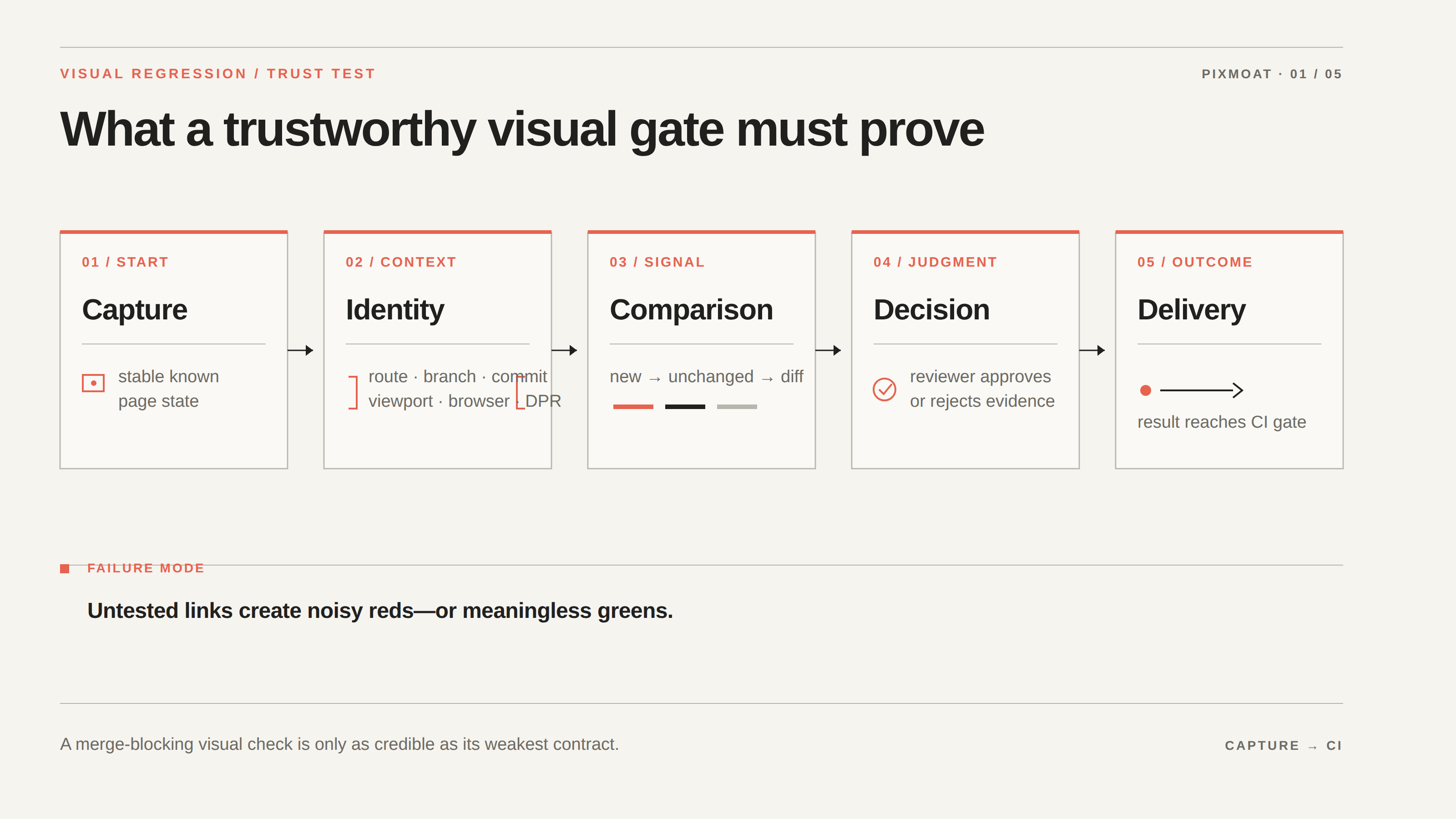
A screenshot comparison answers a narrow question: did the candidate pixels differ from the stored baseline? It does not, by itself, answer whether the page was ready, whether the baseline belongs to the current branch, or whether the change was intentional.
Test the pipeline as five separate contracts:
- Capture: the test reaches a stable, known state before taking the screenshot.
- Identity: the result is associated with the expected test or route, branch, commit, viewport, browser, and device-pixel ratio.
- Comparison: a first run is recognized as new, a repeated unchanged run stays unchanged, and a deliberate edit produces a diff.
- Decision: a reviewer can inspect the evidence and approve or reject the changed run.
- Delivery: the approval or rejection reaches the CI system according to the gate you selected.
Do not treat a failed upload, a flaky capture, a missing baseline, and an intentional redesign as the same failure. They require different fixes. A merge gate becomes credible when the team can distinguish those outcomes without guessing.
Stabilize the capture before testing the gate
Start with one important route, one browser, and one viewport. Use fixed or seeded data. Wait for a visible readiness condition—such as a loaded card or enabled control—instead of relying on a fixed timeout. Make sure fonts and important assets are available before capture, and disable transitions or animations that are not part of the visual contract.
Mask only content that is genuinely outside the test’s purpose. A timestamp, rotating avatar, or live counter may be a good candidate. A whole profile card is not: masking it would also hide the spacing, typography, and layout regressions the test is meant to catch.
Run the same screenshot twice before changing any code. If the second image differs from the first, stop the rehearsal and fix the observation. Check readiness, test data, fonts, browser image, viewport, device-pixel ratio, and masks. Increasing a global tolerance can reduce noise, but it can also hide a small real change. Tolerance is a narrowly justified control, not a substitute for deterministic setup.
For an existing suite, the lowest-friction approach is usually to keep the Playwright assertion and add the visual service’s reporter around it. For new or more explicit coverage, use a fixture API. The Playwright integration guide documents both approaches and the shared build lifecycle.
Use the new → unchanged → diff sequence
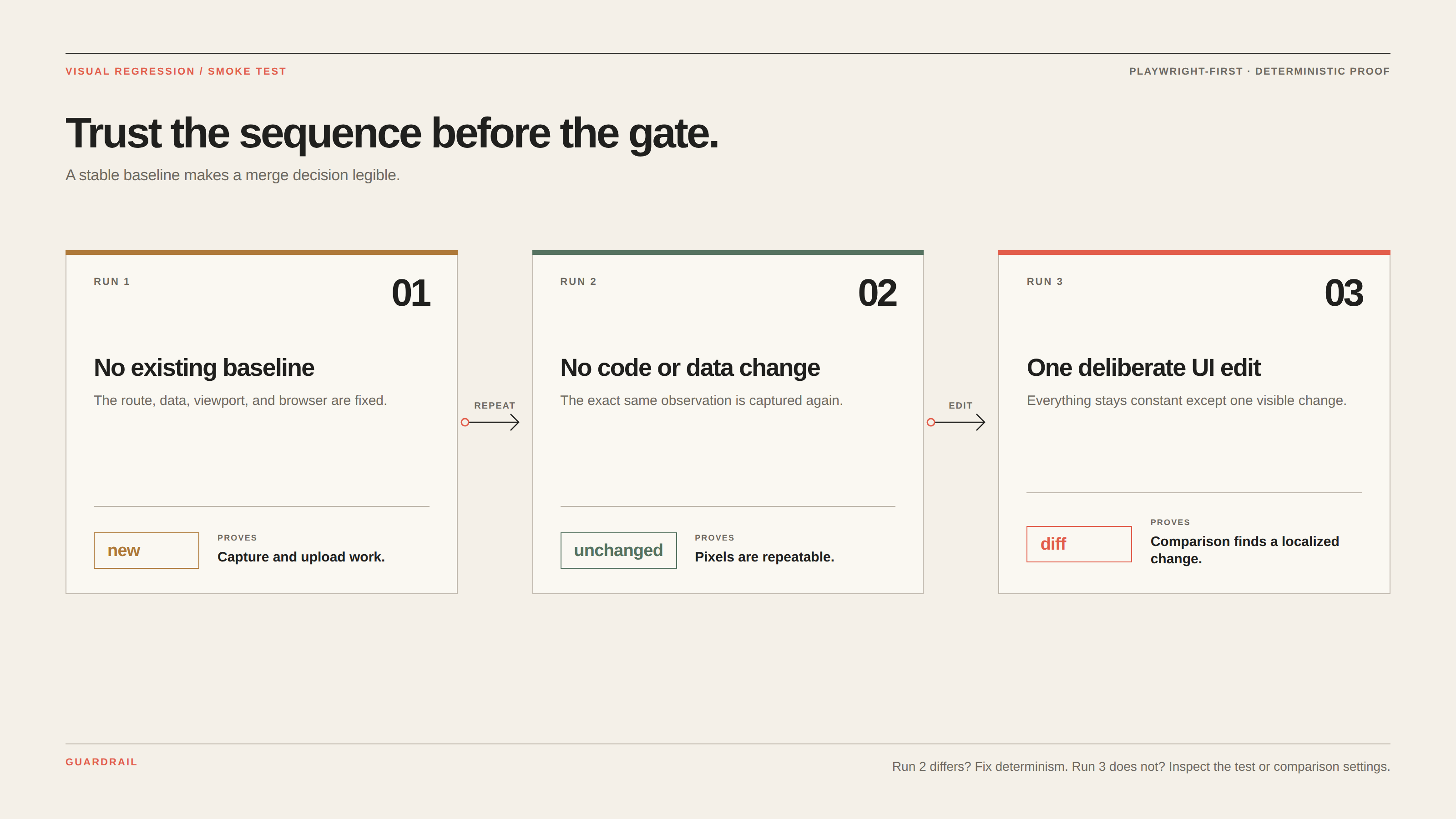
The most useful smoke test for a visual pipeline is a controlled three-run sequence:
| Run | Change to the rendered page | Expected result | What it proves |
|---|---|---|---|
| 1 | No existing baseline | new | Capture and upload work; the snapshot identity is understood |
| 2 | No code or data change | unchanged | The same state produces repeatable pixels |
| 3 | One deliberate UI edit | diff | Comparison detects a real, localized change |
This sequence separates pipeline mechanics from product judgment. The first run is a coverage decision: is this screenshot worth keeping? The second is the trust check. The third is the intentional-diff test: can a reviewer see the change, decide what it means, and send a result back to CI?
If the third run remains unchanged after the deliberate edit, inspect the test first. The page may not have rendered the modified code, the screenshot may target a different route, or the comparison may be too permissive. If the second run is a diff, do not approve it as a baseline update. You have not yet proved that the capture is stable.
Reproduce the intentional diff with Playwright
Use an existing stable screenshot test, or begin with a minimal route such as a checkout form:
import { test, expect } from "@playwright/test";

test("checkout form", async ({ page }) => {
  await page.goto("/checkout");
  await expect(page).toHaveScreenshot("checkout.png");
});
Run the test with a fixed fixture and no baseline. Confirm that the result is new and that the review output gives you a direct way to inspect the candidate. Run it again without changing the page. Confirm unchanged.
Now make one visible, intentional edit—for example, change the checkout button’s padding or fill color in the application stylesheet. Keep the route, data, browser, and viewport the same. Run the test again and inspect the diff.
The reviewer should be able to answer three questions:
- Is the changed region the button or another expected part of the page?
- Does the merge request contain the corresponding CSS or design-token change?
- Is the change complete at this viewport, or did it introduce a layout problem nearby?
Approve the diff only when the change is intentional and complete. Reject it with a specific comment when it is accidental or incomplete. Then run the test once more after the decision. The final run should agree with the new visual state, rather than leaving the team uncertain whether the baseline or the code is authoritative.
Test the CI result separately from the screenshot
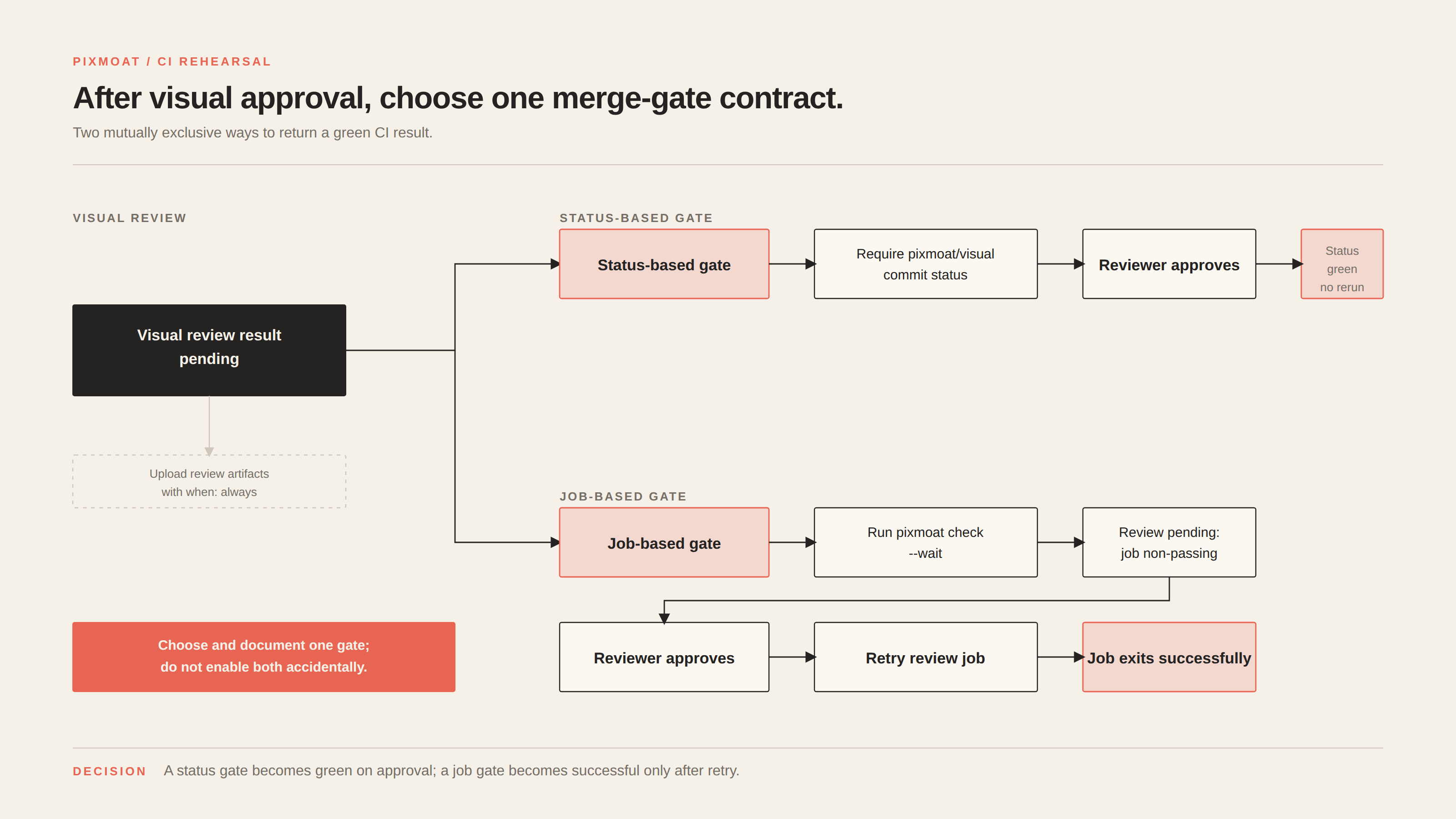
Once the three-run sequence works, test the pipeline’s merge behavior. Start in report-only mode if the team is still learning the signal. The visual job should upload its review artifacts even when the result is blocked, and it should be scoped to UI-relevant changes so backend-only work does not wait for an irrelevant visual review.
For GitLab, the documented reporter can produce a dotenv file containing the review URL, JUnit results for the merge-request test summary, and a self-contained HTML report. Keep those artifacts configured with when: always. The merge request guide shows how the review result appears where the team already works.
Then choose and test one gate:
- Status-based gate: require the
pixmoat/visualcommit status. A reviewer’s approval can turn the status green for that commit without rerunning screenshot capture. - Job-based gate: run a separate
pixmoat check --waitjob. While review is pending, it remains non-passing; after approval, retry that review job and confirm that it exits successfully.
Do not enable both accidentally and assume they mean the same thing. A status-based gate is a commit check. A job-based gate is a CI execution. Document which one reviewers should watch and what they should retry after approval. The merge-request integration guide lists the documented exit codes and both gate patterns.
Where Pixmoat fits
Pixmoat is a Playwright-first workflow and Playwright-only in v1. It receives screenshots from Playwright through the capture client or reporter, compares them with deterministic pixel comparison, and records build and review state against the project, branch, and commit identity.
The relevant fit here is the complete review loop: new and changed screenshot results, branch-aware baselines, explicit approve/reject decisions, and CI outputs for review links and merge status. Project configuration also supports report_only and blocking modes, so a team can keep the same visual coverage while it proves the signal before making it a hard gate.
Pixmoat does not make your application deterministic. Your Playwright tests still own data setup, readiness checks, fonts, animations, masks, browser selection, and snapshot identity. It also does not decide whether a consistent redesign is good; that remains a human or explicitly configured approval decision. If you need a local feedback loop, local comparison is useful for iteration, but CI remains the authoritative check.
Run the intentional-diff test
Before allowing a visual result to block merges, run one stable Playwright route through new, unchanged, and a controlled diff. Then verify the exact approval-to-green path your team will use in CI. If any step is ambiguous, keep the check report-only and fix the workflow while the scope is small.
When the sequence is repeatable, run the intentional-diff test with the Playwright integration, then use the merge-request workflow to choose the gate that matches your CI policy.