pixmoat / field notes / Problem-aware
How to review visual diffs without becoming a merge-request bottleneck
A visual diff becomes a merge-request bottleneck when every changed screenshot is treated as a separate emergency. The reviewer opens a failed job, downloads artifacts, compares full-page images one by one, asks whether each change was intentional, and leaves the merge request waiting while the rest of the team moves on.
The problem is not that visual regression testing produces too much information. It is that the information is often presented without enough context or triage structure.
A workable review process should help you answer three questions quickly:
- Is the capture trustworthy?
- Is the visual change intentional?
- What single decision should go back to CI?
Why visual diff review gets slow
A screenshot change does not automatically mean a product defect. It can represent a planned redesign, a new snapshot with no baseline, a font-rendering variation, unstable test data, or an accidental layout regression.
Those cases need different responses:
| Result | What it usually means | Reviewer action |
|---|---|---|
| Unchanged | The candidate matches its baseline | No visual decision needed |
| New | No baseline exists for this snapshot identity | Confirm that the new coverage is expected |
| Diff | The candidate differs from the baseline | Inspect and approve or reject |
| Flaky or quarantined | Repeated captures disagree with one another | Fix or investigate capture stability |
| Missing or failed | Capture, upload, or processing did not complete | Treat it as an infrastructure or test issue |
A review queue becomes especially painful when these outcomes are collapsed into one red CI status. A reviewer may spend time inspecting a screenshot that was never stable enough to review, or approve a broad change simply to unblock a merge.
The comparison itself also needs context. A useful visual review includes the baseline, current image, and changed pixels, along with the viewport and branch that produced them. Without that identity, the reviewer cannot tell whether the diff represents a UI change or an accidental comparison against the wrong baseline.
A practical review workflow
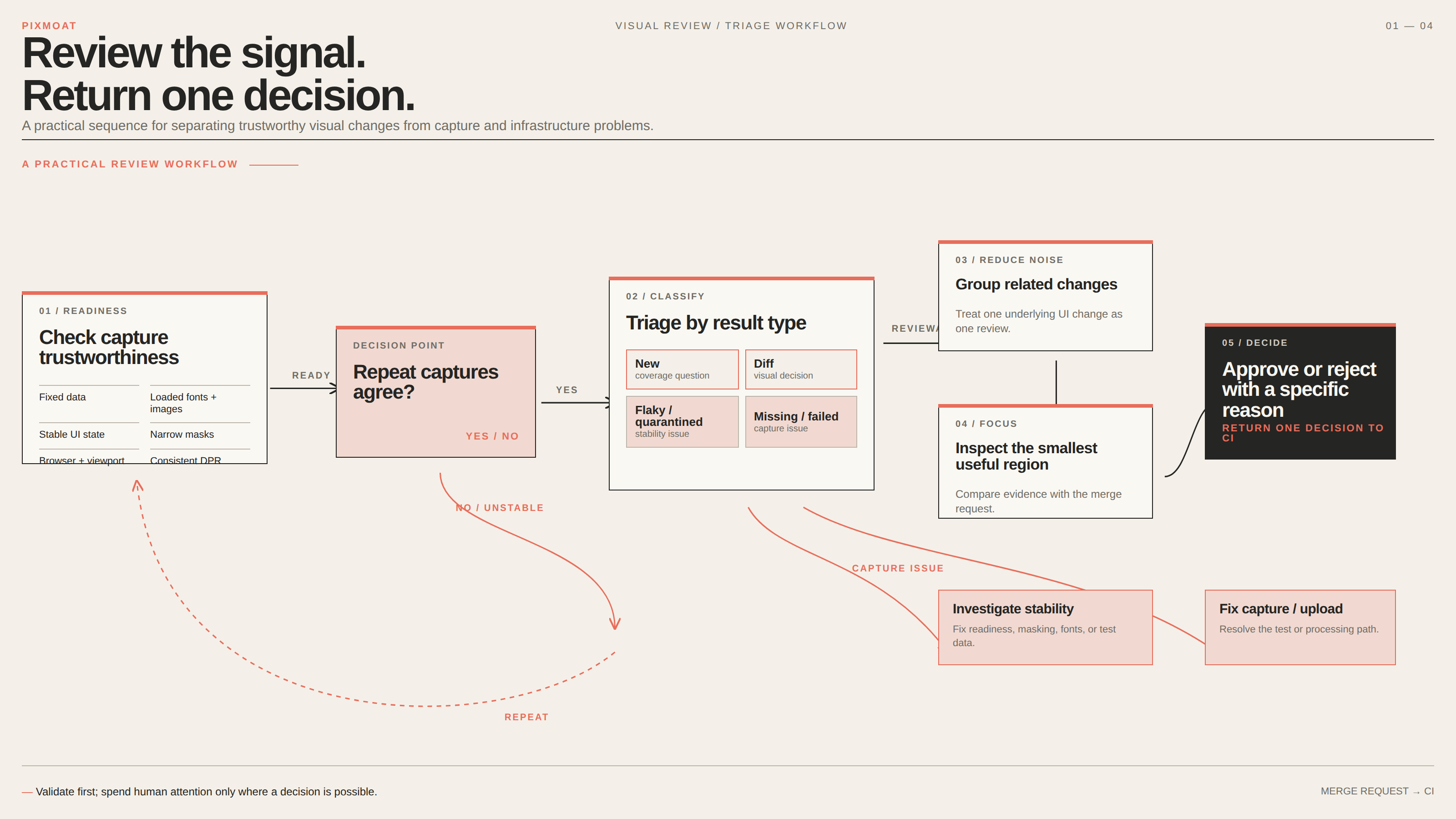
Start with the capture, not the pixels. Before deciding whether a change is acceptable, check that the page was rendered in a repeatable state:
- Test data is fixed or seeded.
- Fonts and important images have loaded.
- The test waits for the relevant UI state.
- Timestamps, rotating content, and other genuinely dynamic regions are masked narrowly.
- The browser, viewport, and device-pixel-ratio configuration are consistent.
If an unchanged page produces different images on repeated runs, pause the review. A more permissive tolerance may make the queue quieter, but it can also hide a real layout change. Diagnose the capture first. The guide on dealing with flaky Playwright screenshots covers a repeat-capture approach for separating product changes from unstable observations.
Once the capture is trustworthy, review in this order:
1. Triage by result type
Look at new, diff, flaky, and missing results separately. Do not let a large group of unchanged screenshots distract you from the small number that need a decision.
New snapshots deserve a coverage question: was this route or viewport intentionally added? If yes, approve the new baseline according to your team’s process. If not, investigate why the test started producing it.
Flaky results deserve a stability investigation, not a visual approval. Missing results usually point to a capture or upload problem rather than a design decision.
2. Group related changes
Several screenshots may represent one underlying UI change. A shared color-token update, for example, can affect a button, navigation item, and card in multiple viewports. Review those results as one change when the evidence supports that conclusion.
A useful grouping signal is the nature of the change:
shiftsuggests a layout reflow, margin change, or height difference.colorsuggests that structure stayed similar while color changed.textsuggests a narrow glyph-like region changed.content_addedorcontent_removedsuggests that a component appeared or disappeared.noisesuggests scattered, low-severity anti-aliasing variation.unclassifiedmeans the available heuristics did not identify a strong pattern.
These classifications are deterministic and rule-based, not AI-powered. They are triage hints, not proof of intent. The visual review guide explains how to use that evidence without treating it as an automatic approval.
3. Inspect the smallest useful region
Begin with the changed region instead of zooming around an entire page. Ask:
- Does the change match the files modified in the merge request?
- Does the direction of the change make sense?
- Are neighboring elements affected?
- Is the change consistent across viewports?
- Does the diff show a real product change or rendering noise?
Use side-by-side comparison when you need context, an overlay slider when you need to see alignment, diff highlight when you need to locate changed pixels, and blink mode when the difference is easier to understand as a rapid A/B comparison.
4. Make one explicit decision
Approve a change only when you can explain why it is expected. Reject it when the change is unintentional, incomplete, or too broad to accept. A rejection should include a short, specific comment such as “The new card pushes the action row below the fold at 375px; preserve the existing mobile spacing.”
That comment is more useful than “looks wrong.” It gives the person fixing the merge request a concrete visual requirement and gives the next reviewer a record of what was previously rejected.
Do not finish the review while diff or new runs remain undecided. A review session should represent a complete decision about the build, not a partial thumbs-up hidden inside a green-looking merge request.
A reproducible three-run example
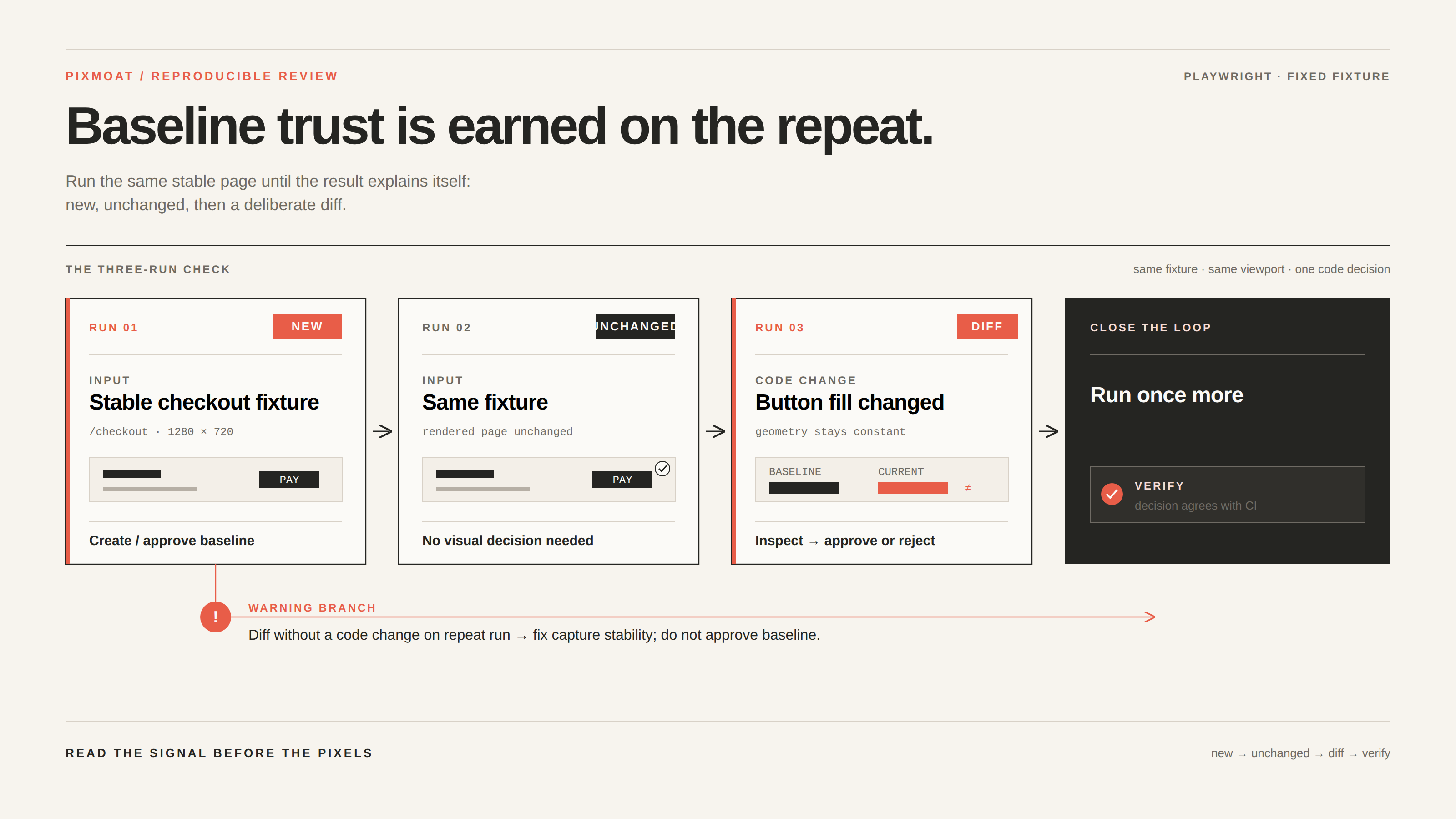
You can test this workflow with an existing Playwright screenshot assertion:
test("checkout form", async ({ page }) => {
  await page.goto("/checkout");
  await expect(page).toHaveScreenshot("checkout.png");
});
Run the same test three times against a stable checkout fixture:
- Run it with no existing baseline. The result should be
new. - Run it again without changing the rendered page. The result should be
unchanged. - Change one deliberate visual property, such as the checkout button’s fill color, and run it again. The result should be
diff.
Now review the third run rather than immediately updating the baseline. Compare the baseline and candidate, confirm that the changed area is the button, and check that the merge request contains the corresponding CSS or design-token change. If the geometry is unchanged and the color difference is strong enough, the deterministic classifier may identify it as color; if surrounding layout also moves, the result may instead be classified as a shift or remain unclassified.
Approve the diff if the color change is intentional. Reject it with a comment if the button changed accidentally. Then run the test once more after the code decision. This confirms that the review decision and the next CI result agree.
When the same test produces a diff on the second run without a code change, stop and fix readiness, masking, fonts, or test data before reviewing. That is a capture problem, not a baseline-approval problem.
Where Pixmoat fits
Pixmoat is a Playwright-first, Playwright-only-in-v1 visual review workflow. Its comparison is deterministic pixel comparison. It can receive screenshots from Playwright tests, compare them with branch-aware baselines, expose changed regions and deterministic nature metadata, and provide a review session where individual runs can be approved or rejected.
The review experience is designed to reduce repetitive inspection: side-by-side, slider, diff-highlight, blink, zoom and pan views; keyboard navigation with j and k; approval and rejection shortcuts; bulk approval with a confirmation step; progress showing decided versus pending runs; and live build updates. Group approval includes per-run guardrails, so treating related changes together does not silently expand approval authority.
Pixmoat can also return the review result to CI. In the documented GitLab workflow, a reviewer can open a direct review link from the merge request, and the pixmoat/visual status can turn green after approval without rerunning the capture job. Teams that need a hard pipeline gate can use the CLI review job instead. Teams adopting visual testing gradually can begin with report-only behavior and make selected projects blocking after the signal is trustworthy. See the merge-request integration guide for those choices.
Pixmoat does not decide whether a redesign is good, make an unstable page deterministic, or replace functional Playwright assertions. Your tests still own page readiness, data setup, browser coverage, and the decision about what the product should look like. If you need to connect an existing toHaveScreenshot() suite, the Playwright integration guide documents the reporter and fixture approaches.
The goal is not to eliminate human judgment. It is to reserve that judgment for the changes that actually need it, with enough evidence to make one clear decision.
View the review demo to see the comparison and approval workflow in action.