pixmoat / field notes / Implementation
How GitLab Merge Requests Turn Green After Pixmoat Visual Review
When visual review and GitLab disagree
Your GitLab merge request is red because a screenshot changed. A reviewer opens the visual evidence, confirms that the change is intentional, and approves it. Then the team asks the platform owner the uncomfortable question: why is the merge request still blocked?
The answer depends on which thing GitLab is waiting for. A visual result can be exposed as a commit status, as a failing CI job, or as both. Those paths have different recovery steps after approval. If they are not designed deliberately, reviewers approve work but developers still rerun the wrong job—or a permissive CI setting lets a merge proceed without any review.
This guide explains how to expose the review link, choose a merge gate, understand approval, retry only when needed, and troubleshoot a red merge request without creating duplicate visual builds.
The important distinction: status green versus pipeline green
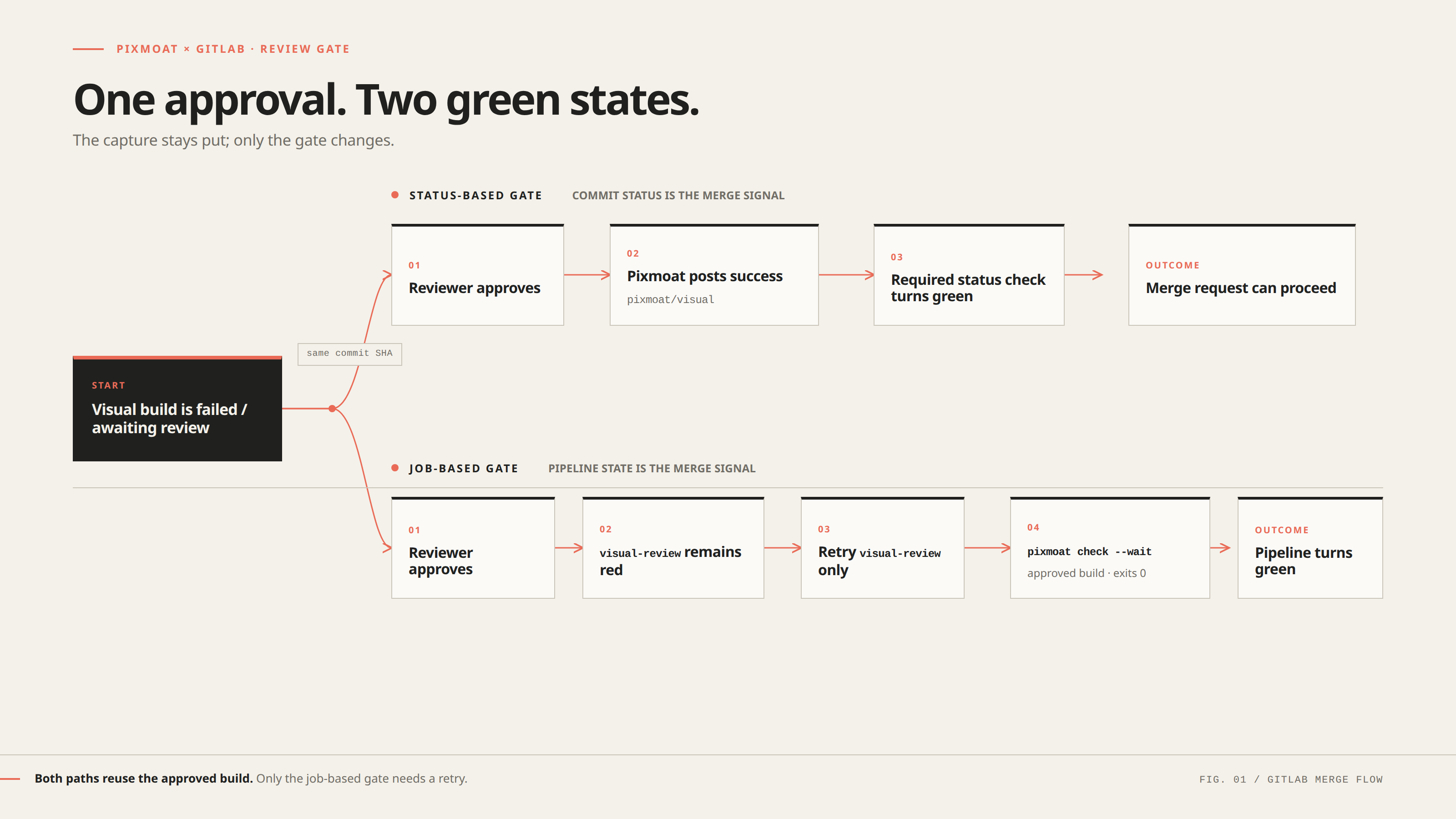
GitLab attaches a commit status to a specific commit SHA. A pipeline job, by contrast, has its own execution state. Visual approval can update the first without rerunning the second.
There are three useful rollout choices:
| Workflow | What GitLab waits for | What happens after approval |
|---|---|---|
| Report-only | Nothing visual is required to merge | The reviewer can inspect results, but the visual job is not a gate |
| Status-based gate | The pixmoat/visual commit status is required | Pixmoat posts success; no CI rerun is needed |
| Job-based gate | A hard-failing review job must pass | Retry the review job; it checks the approved build and exits 0 |
Report-only is useful while you establish stable screenshot coverage, but it is not a merge gate. In particular, allow_failure: true lets GitLab treat a failed visual job as acceptable, so remove it once the check must block merges.
The status-based path is smoother when your GitLab setup supports required status checks. The job-based path is the dependable fallback when the merge policy is “pipelines must succeed.” Choose one primary gate and document it for reviewers.
Put a review link where the reviewer already works
The capture job should always publish its generated report files, including when the visual result blocks the job.
For a Playwright project, the documented Pixmoat reporter can write three GitLab-friendly artifacts:
pixmoat.env, which exportsPIXMOAT_REVIEW_URLfor a GitLab environment link;junit.xml, which populates the merge request test summary; andreport.html, a downloadable summary with counts and a link to the review page.
The Playwright integration guide covers capture and reporter setup. In the GitLab job, keep the service URL, project name, masked project token, branch, full commit SHA, pipeline or job URL, and merge request IID explicit. Set artifacts to when: always; otherwise a blocked job may fail before GitLab receives the link.
If the job’s environment: link disappears when the job fails, use the documented companion-job pattern. A small job can inherit the dotenv artifact, print the review URL, and expose the environment link with when: always.
Choose and configure the merge gate
Status-based gating
In Pixmoat, open the project’s Settings > Git Provider, select GitLab, and configure the GitLab base URL, repository path or numeric project ID, and a token with the api scope. The token needs write access to the target repository. Once enabled, Pixmoat posts pixmoat/visual for each built commit.
The status lifecycle is intentionally simple: running while screenshots upload, failed for blocking visual changes or processing errors, and success when the build is clean or the review is approved. In GitLab, add pixmoat/visual as a required check under the project’s merge-check settings when you want it to block merges.
With this model, the review decision is the merge-gate event. When the reviewer finishes an approved review, Pixmoat posts success for the same SHA. The merge request can turn green without rerunning the Playwright capture job.
Job-based gating
If the merge policy is based on successful pipeline jobs, keep the capture job and add a separate visual-review job. That job runs pixmoat check --wait against the same project, branch, and commit. Do not mark the review job as allowed to fail.
The CLI’s documented exit contract is:
0: the build is approved or has no changes;1: the build was rejected;2: review timed out while still pending; and3: the build was not found or an error occurred.
The visual-review job stays red while a human decision is pending. After approval, retry that job. It checks the now-approved build, exits 0, and lets the pipeline turn green. You do not need to rerun the screenshot capture merely to acknowledge an approval.
A reproducible approval-to-green example
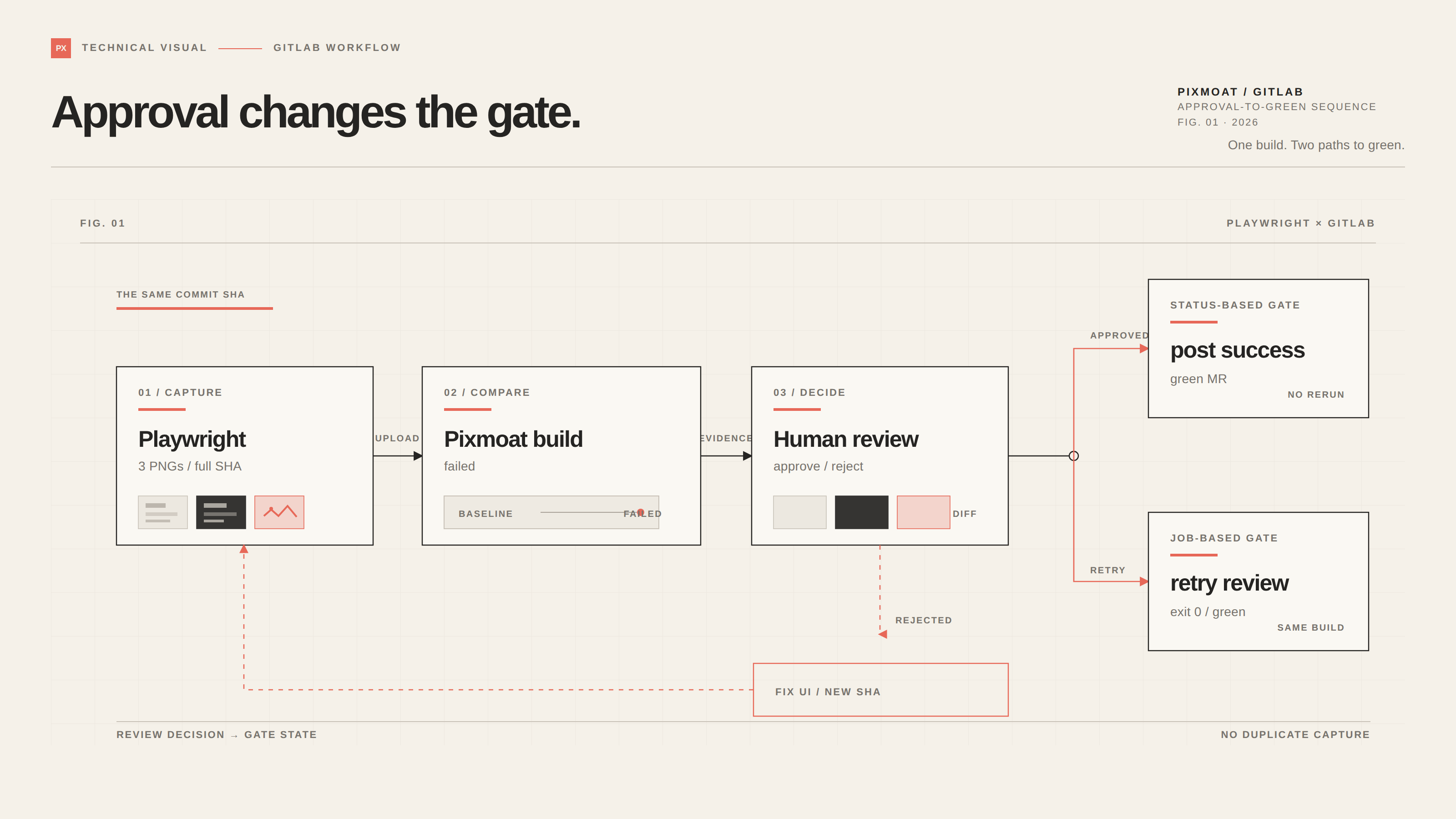
Consider a merge request that changes a button style and produces three changed screenshots.
- The Playwright job runs with
CI_COMMIT_SHAas the Pixmoat commit identity and uploads the three images. GitLab receives the review URL, JUnit results, and HTML artifact. - Pixmoat compares the images with the branch baselines using deterministic pixel comparison. The merge request shows
pixmoat/visual — failedbecause the changes are not yet reviewed. - The reviewer opens the link, checks baseline, current image, and diff, then approves all three runs and finishes the review.
- In the status-based setup, Pixmoat posts
successfor that commit. The required check turns green immediately. - In the job-based setup, the reviewer or automation retries only
visual-review.pixmoat check --waitfinds the approved build and exits0; the pipeline turns green.
If the reviewer rejects the button change, the status remains failed. The developer fixes the UI, pushes a new commit, and lets the capture job create the next comparison. Approval is not a substitute for correcting an accidental regression.
One more retry detail matters. Retrying the capture job for the same project, branch, and commit SHA does not create a second canonical build: Pixmoat reopens the existing build, removes its previous runs, and accepts the new upload. That makes capture retries safe, but does not change the approval flow: status-based approval needs no capture retry; a hard job gate needs a retry of the waiting review job.
Troubleshoot the red check in the right order
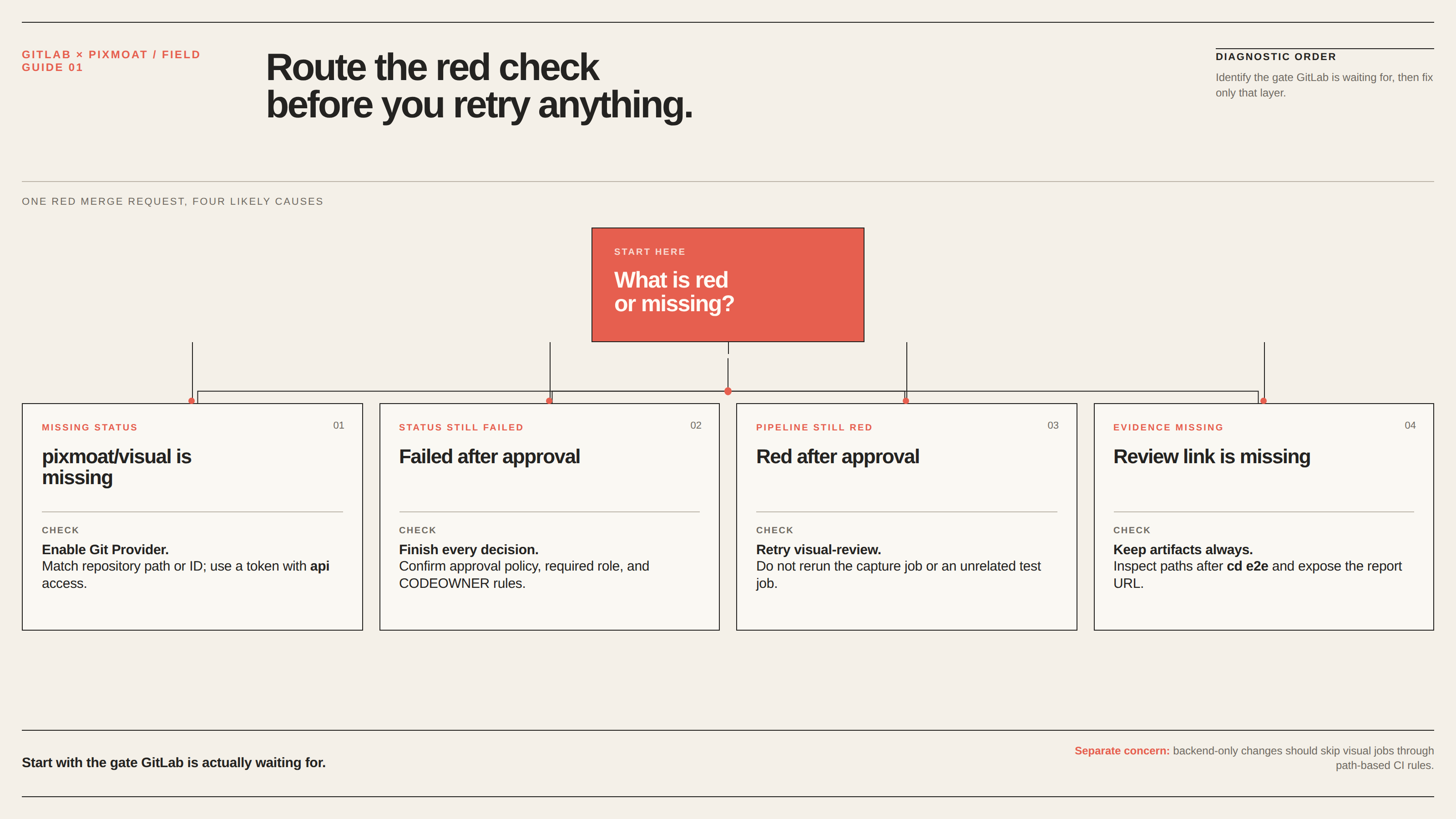
Start by identifying which gate is red.
- If
pixmoat/visualis missing, check that Git Provider is enabled, the repository path or ID matches GitLab, and the token has the requiredapiaccess. - If the status is failed after approval, check whether a review policy requires more approvers, a particular role, or a CODEOWNER approval. The status stays failed until all runs are decided and the policy is satisfied.
- If the pipeline remains red after approval, confirm that you retried
visual-review, not just an unrelated test job. A job-based gate cannot infer a human decision unless it checks the build again. - If the MR has no review link, inspect artifact paths and the job working directory. A
cd e2eor similar change can movepixmoat-report/somewhere different from the declared GitLab artifact path. - If backend-only changes trigger visual work, use
rules: changes:to skip capture and review jobs for paths that cannot affect the UI.
For a complete setup walkthrough, including the companion link job and the two gate choices, use the GitLab merge request integration guide. It also documents required approvals and merge-driven baseline promotion, which is separate from turning the current commit check green.
Where Pixmoat fits—and where it does not
Pixmoat is the visual evidence and review layer in this workflow. It is Playwright-first and Playwright-only in v1: your existing Playwright tests capture the page, the reporter uploads PNGs, and Pixmoat records the build against its branch and commit identity. The comparison is deterministic pixel comparison, not AI-powered diffing.
Pixmoat can post the GitLab commit status and expose the review result, but GitLab still owns the merge policy. Your tests still own page readiness, test data, browser selection, and whether a route is worth covering. A reviewer—or an explicitly configured approval policy—still decides whether a consistent visual change is acceptable. Pixmoat does not make an unstable page deterministic or replace functional assertions.
That separation is useful operationally: CI produces evidence, Pixmoat records a review decision, and GitLab enforces the merge rule you selected. Once the boundaries are clear, “approved” and “green” become predictable states instead of a manual ritual.
Configure the status reporting path
If you want the shortest path from an approved visual review to a green GitLab merge request, start with the GitLab commit status configuration. Configure pixmoat/visual, add it as a required check where supported, and keep the artifact-based review link in the capture job. If your project gates on pipeline jobs instead, use the same guide’s visual-review pattern and make the approval-to-retry step explicit in your team’s review checklist.