pixmoat / field notes / Problem-aware
How branch-scoped baselines prevent parallel merge-request collisions
When two merge requests change the same UI at the same time, a shared visual baseline can turn a useful regression check into a race. One branch approves a new layout, another approves a color change, and both reviews appear to be judging the work against “the baseline”—but that baseline may have changed while the reviews were in progress.
The result is familiar: a branch looks clean locally but fails after another merge, a reviewer approves a screenshot that includes someone else’s work, or a target branch silently loses the visual context that justified an earlier approval. The fix is to separate branch review state from the default branch’s history. Branch-scoped baselines do that by giving each branch an isolated comparison target, then promoting approved changes to the target branch only when the merge is real and the target has not moved underneath the review.
Why shared baselines collide
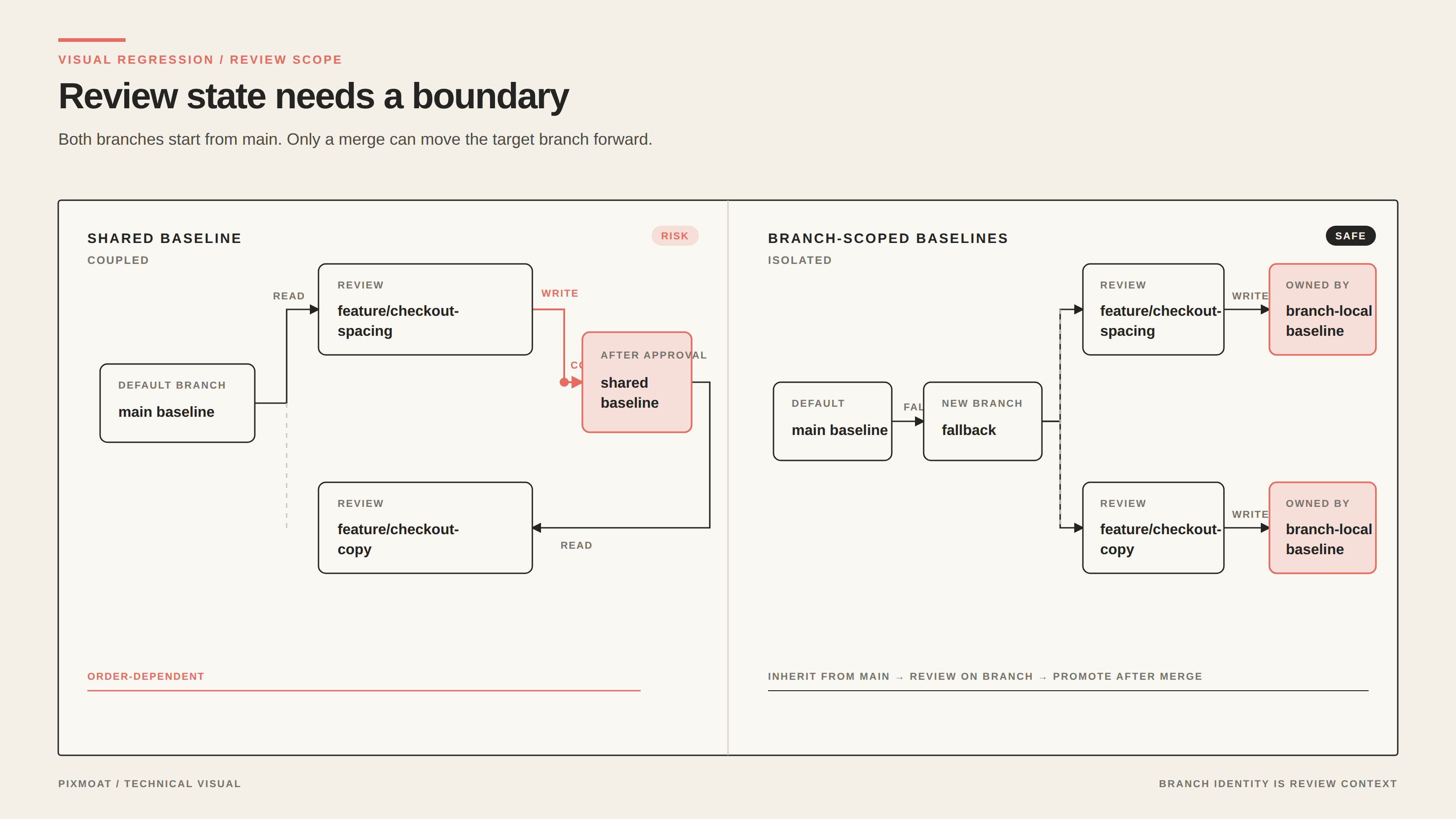
A visual baseline is the approved image for one snapshot identity: usually a test or route name combined with its viewport, browser, and device-pixel ratio. A comparison asks whether the current capture matches that approved image. If every branch writes to one global baseline, the answer can change because of an unrelated merge request.
Consider two branches created from main:
| Branch | Change | Risk with one shared baseline |
|---|---|---|
feature/checkout-spacing | Moves the summary card lower on mobile | Its approval changes what the other branch compares against |
feature/checkout-copy | Changes the empty-state text | It may be reviewed against the spacing branch instead of main |
This creates three kinds of coupling:
- Review coupling: the order in which branches upload and get approved affects the next diff.
- Merge coupling: a baseline approved for one branch may be copied to the target before that branch actually merges.
- Decision coupling: a reviewer has to remember which other changes were already included in the image they are approving.
The problem is not solved by making the pixel threshold more permissive. A higher tolerance can hide a real layout change while leaving the branch identity ambiguous. Nor is it solved by treating every diff as a failure that must immediately replace the baseline. A baseline is a statement about expected UI state, so it needs the same scope as the code being reviewed.
The branch-scoped model
The safer model stores the approved image per snapshot and branch. When a build runs on a feature branch, resolution follows a simple order:
- Find the baseline for the snapshot on the current branch.
- If that branch has no baseline, fall back to the project’s default branch.
- If neither branch has one, classify the result as
newand require an approval. - Compare the candidate image with the resolved baseline.
That fallback matters. A newly created branch does not need a complete copy of every main baseline before it can run visual checks. It can start by comparing against the default branch. Once a change is approved on the feature branch, the approval belongs to that branch; it does not cascade to main or to another open branch.
The distinction is easiest to remember this way: a feature branch may inherit the default branch’s starting point, but it owns its subsequent review decisions. The target branch advances later, as a consequence of a merge—not as a side effect of a review that might never be merged.
A practical workflow for parallel merge requests
1. Make snapshot identity explicit
Every CI build should send the branch and commit that produced its screenshots. In a GitLab job, the documented integration uses variables like these:
variables:
  PIXMOAT_BRANCH: ${CI_COMMIT_REF_NAME}
  PIXMOAT_COMMIT: ${CI_COMMIT_SHA}
  PIXMOAT_PR: ${CI_MERGE_REQUEST_IID}
The branch separates review state. The commit makes the build traceable. The merge-request number connects the result to the review context. Keep the viewport, browser, and DPR stable as well; changing any part of the snapshot identity can legitimately produce a new comparison key rather than a collision.
For a Playwright suite, the Playwright integration guide documents the corresponding environment variables, including PIXMOAT_BRANCH, PIXMOAT_COMMIT, and PIXMOAT_PR, as well as the fixture and reporter approaches.
2. Keep the default branch trustworthy
The default branch is the fallback for new feature branches, so it should represent a reviewed state. Start with a small set of stable routes and make sure repeated captures are actually unchanged before expanding coverage. If the default branch is noisy, every new branch inherits that uncertainty.
Treat a new baseline as a review decision, not as a setup chore. Confirm the route, viewport, browser, and changed files before approving it. If the page is unstable, fix readiness, test data, fonts, or masking first.
3. Approve on the branch where the change was reviewed
A reviewer should be able to answer: “Which branch and commit produced this image, and is the visual change present in this merge request?” Approving a feature build updates that feature branch’s baseline only. It does not rewrite the default branch while the merge request is still open.
This also makes re-runs easier to reason about. A retry for the same project, branch, and commit reuses the canonical build rather than creating a duplicate, so the review is refreshed in place instead of producing another competing record.
4. Promote only after the merge
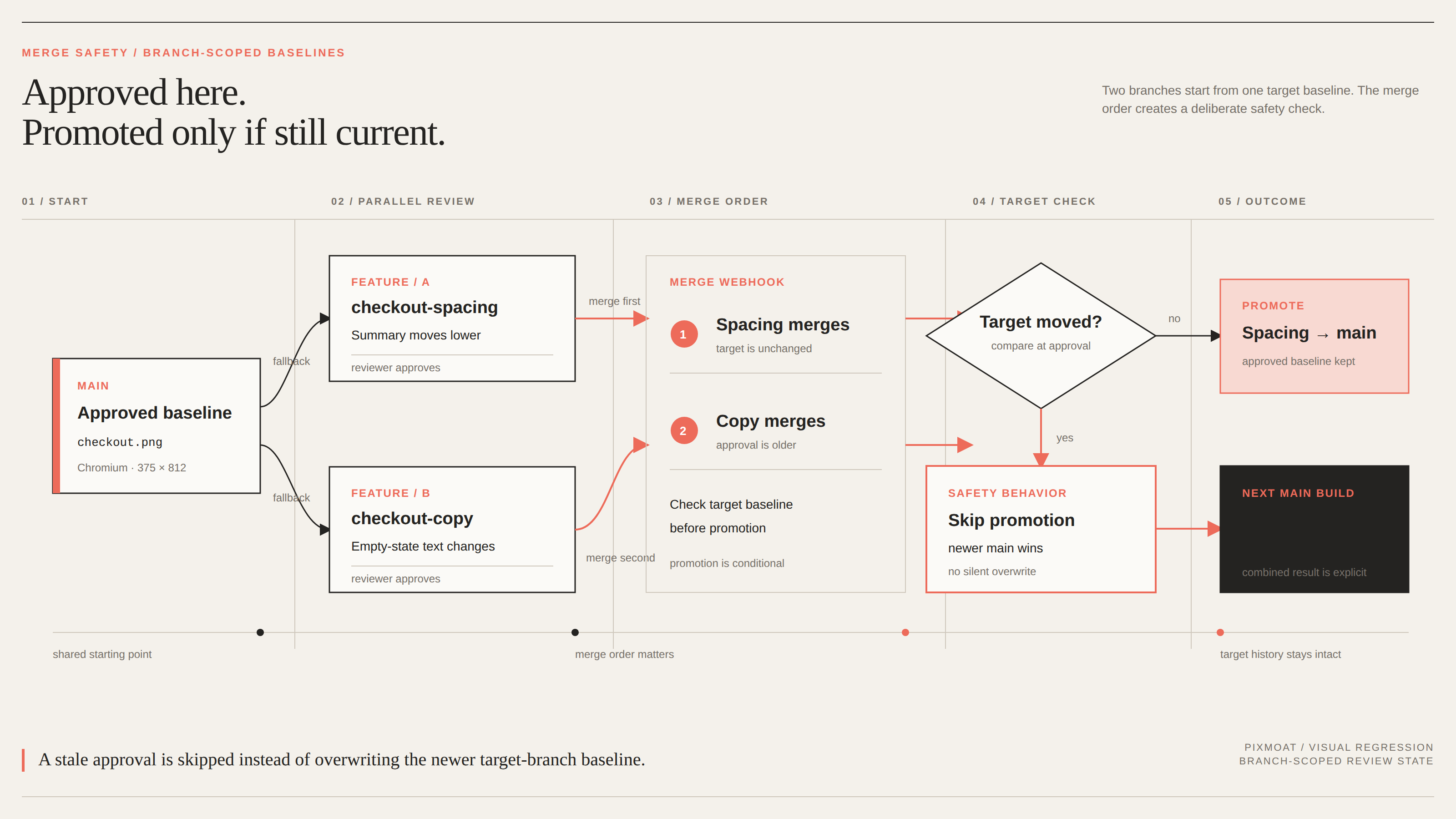
After the merge request is accepted, a merge webhook can promote approved feature-branch baselines to the target branch. The merge-request integration guide describes this workflow for GitLab: the webhook finds the approved build, checks each screenshot against the target branch’s state at approval time, and promotes only screenshots that are still up to date.
If another merge request changed the same target baseline first, the later promotion is skipped for that screenshot. That is the important safety property. The system does not silently overwrite newer work; the next target-branch build shows the affected screenshot as changed and asks for a fresh review.
Without the merge webhook, target-branch baselines can still advance when CI runs directly on that branch, but an approved feature result is not automatically promoted at merge time. Make that choice explicit in the team’s workflow.
A reproducible two-branch example
Start with a stable Playwright screenshot:
test("checkout form", async ({ page }) => {
  await page.goto("/checkout");
  await expect(page).toHaveScreenshot("checkout.png");
});
Assume main already has an approved baseline for checkout.png at 375x812 in Chromium. Now create two branches from the same main commit:
feature/checkout-spacingchanges the mobile spacing around the order summary. Its first build has no branch-local baseline, so it falls back tomain. The reviewer confirms the layout change and approves it. The approved image is written tofeature/checkout-spacingonly.feature/checkout-copychanges the empty-state text. Its build also falls back to the unchangedmainbaseline, not to the spacing branch. The reviewer can therefore evaluate the copy change independently and approve it onfeature/checkout-copy.- Merge the spacing branch first. The merge webhook promotes its approved image to
mainbecause the target baseline is still the one the reviewer saw. - Merge the copy branch second. Its approval was based on the older
mainbaseline, so the up-to-date check skips that screenshot instead of replacing the spacing change. The nextmainbuild compares the copy branch’s result with the now-current target baseline and requests a new decision.
The final extra review is intentional. It is cheaper than silently losing one of the two approved changes, and it gives the team a precise place to decide whether the combined result is correct.
For local iteration, keep the same scope. After switching branches, run pixmoat baselines sync --branch <branch> so the local cache matches the branch you are editing. The visual review guide keeps the final decision focused on the expected product change, while CI remains authoritative.
Where Pixmoat fits
Pixmoat is a Playwright-first, Playwright-only-in-v1 workflow for capturing and reviewing screenshots. Its comparison is deterministic pixel comparison, with branch-aware baselines, default-branch fallback, append-only baseline history, and merge-driven promotion with stale-promotion detection. The relevant baseline and project settings are also documented in the project configuration guide.
That structure addresses the collision problem; it does not decide whether a visual change is good, make an unstable page deterministic, or resolve two product changes that are semantically incompatible. Your Playwright tests still own page readiness, data setup, browser coverage, and snapshot naming. Reviewers still decide whether the combined UI is correct. A branch-scoped baseline simply ensures each reviewer makes that decision against the right branch state.
If parallel merge requests are causing repeated visual re-review, start by reading the baseline and merge-request documentation. Define the branch and commit identity in CI, establish one trustworthy default-branch baseline, and enable merge-time promotion only after the up-to-date check is part of your review process.