pixmoat / field notes / Problem-aware
A QA Guide to Triage Mixed Playwright Visual Builds
A red visual build rarely contains one kind of problem. The same run can include a new screenshot with no baseline, a missing snapshot that was never uploaded, a flaky capture that disagrees with itself, and a genuine UI change. If you review all of them as ordinary pixel diffs, you spend your time on the wrong evidence and make baseline decisions before you know whether the capture is trustworthy.
The useful question is not “Which screenshots are red?” It is “What kind of result is each screenshot, and what decision does that result deserve?” This guide gives you an order for answering it.
Why mixed visual builds are difficult
Screenshot comparison is deliberately literal: it compares a candidate image with a baseline image. That catches layout, styling, and content changes, but pixels do not explain intent. A changed button might be a planned redesign, a broken CSS rule, a different theme, or a capture taken before the page finished loading.
The result type narrows the question:
| Result | What it tells you | First response |
|---|---|---|
missing | A baseline snapshot was expected but was not uploaded in this build | Check test execution, conditions, names, and upload logs |
flaky | Repeated captures of the same state disagree | Investigate readiness and rendering stability |
quarantined | A snapshot has crossed the configured flaky-build threshold | Treat it as a known stability problem, not a UI approval |
new | No baseline exists for this snapshot identity | Confirm that the coverage is intentional |
diff | The candidate differs from its baseline | Inspect the change and approve or reject it |
unchanged | The candidate matches its baseline | No visual decision is needed |
That distinction prevents two common mistakes. First, a reviewer should not approve a flaky capture just because the current image looks acceptable; the next capture may disagree again. Second, a reviewer should not update a baseline for a missing snapshot before finding out whether the test was skipped or renamed.
The triage order: completeness, trust, coverage, intent
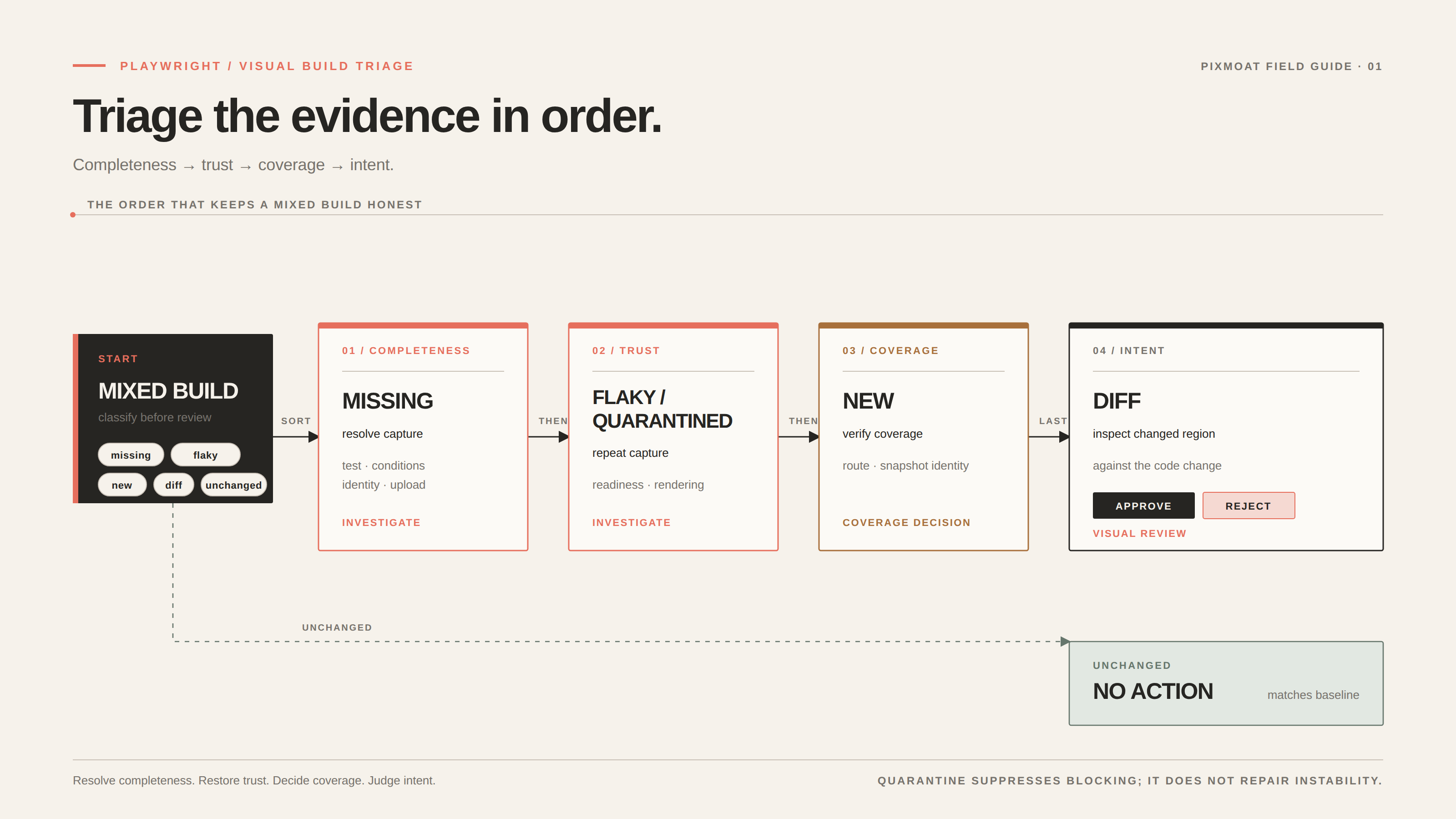
Use this order for a mixed build:
1. Resolve missing results first
Missing results mean that the build cannot be compared as expected. Start with the test job: did the test run, did the route load, did a conditional branch skip the snapshot, and did the upload client receive the image? Check whether a test title, attachment name, viewport, browser, or device-pixel-ratio change created a new snapshot key.
Do not treat “missing” as proof that a screenshot should be deleted. It may represent an intentional removal, but it may also reveal a test discovery or CI failure. If the screenshot is no longer part of the product’s visual contract, record that decision in the team’s normal baseline-removal process. If it is still expected, fix the capture before reviewing any other result.
2. Investigate flaky and quarantined results
A flaky result is an unstable observation. Common causes include timestamps, random data, late-loading fonts or images, CSS animation, asynchronous API responses, and browser-environment differences. Repeat the unchanged capture and compare the captures with one another. If they differ without a code change, the visual signal is not ready for approval.
Stabilize the page before increasing tolerance. Seed or mock data, wait for a user-visible ready state, make the browser and viewport explicit, and mask only content that is genuinely outside the screenshot’s purpose. The guide to dealing with flaky Playwright screenshots goes deeper on this diagnostic.
If a project uses multi-capture detection, repeated mismatch can move a snapshot through stable, flaky, and quarantined states. Quarantine keeps known instability from blocking review completion, but it does not repair the underlying test. Keep a quarantined result in the investigation queue until the page produces stable captures and the configured recovery period is satisfied.
3. Review new snapshots as a coverage decision
A new snapshot has no baseline. It is not a regression yet, but it is still a change to the test suite. Ask three questions:
- Was this route, component, viewport, browser, or DPR added intentionally?
- Is the snapshot identity correct, or did a rename create an accidental new key?
- Does the image show the stable state the team wants to preserve?
If the answer is yes, approve or establish the baseline according to your workflow. If not, fix the test or remove the accidental coverage. Reviewers should see a new screenshot as a contract proposal, not as an automatic green check.
4. Inspect changed screenshots last
Only now is the remaining diff set good evidence for visual review. Start by checking the merge request’s changed files and the snapshot identity. Then inspect the smallest useful region: is the changed area consistent with the code change, does the direction of movement make sense, and does the same change appear at related viewports?
If your tooling exposes deterministic change metadata, use it to prioritize inspection. A shift can point to reflow or spacing; color can point to a token or theme change; text can point to copy or localized content; content_added and content_removed can point to a component or feature-flag change; noise can point to anti-aliasing variation. These are triage hints, not decisions about product intent. The visual review guide documents the practical decision that follows.
Leave a specific decision. “The mobile action row moves below the fold at 375px” is useful rejection feedback; “looks wrong” is not. Approve when the change is intentional and complete. Reject when it is accidental, incomplete, or too broad to accept. Leave unchanged results alone throughout—their purpose is to show that the baseline still matches.
A reproducible three-run example
Use one stable Playwright screenshot test and make the result change deliberately. With an existing toHaveScreenshot() test such as await expect(page).toHaveScreenshot("checkout.png"), run this sequence against fixed data:
- Run the test with no existing baseline. The screenshot should be
new. - Run the same commit again without changing the rendered page. The screenshot should be
unchanged. - Change one visible property, such as the checkout button’s fill color, and run again. The screenshot should be
diff.
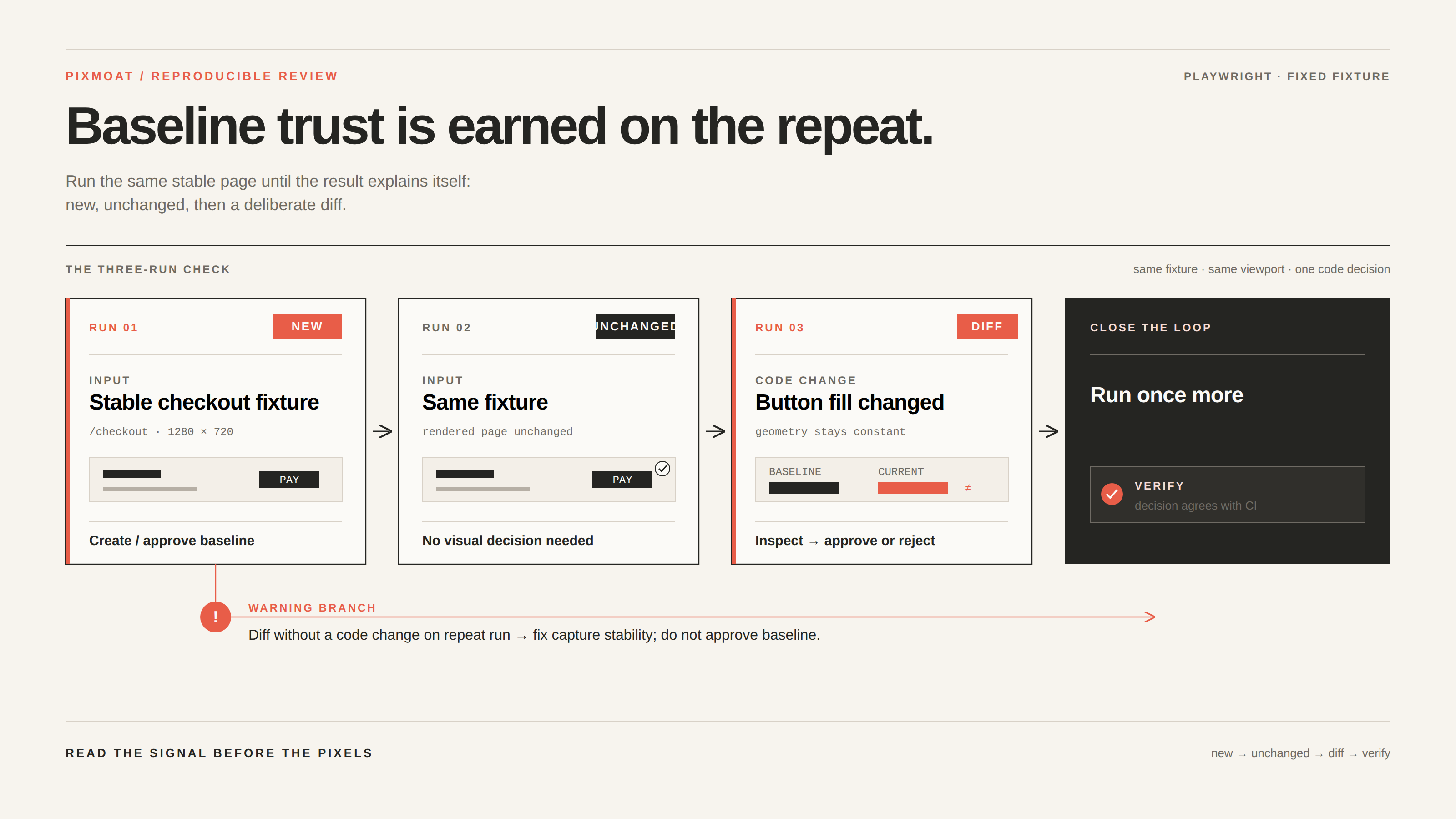
Now apply the triage rule. The first run needs a coverage decision. The second needs no action. The third needs inspection: confirm that the button is the only meaningful changed region and that the code change explains it. If the color change is intentional, approve it; if not, reject it and include the visual requirement in the comment. Run the test once more after the decision to verify that the next result agrees with what the reviewer approved.
To test the other branches, remove the screenshot call or make the route conditional to produce a missing result, then restore it. For flakiness, keep the code unchanged but vary a timestamp or delayed response and run the capture repeatedly. Practice classifying evidence before changing a baseline.
Where Pixmoat fits
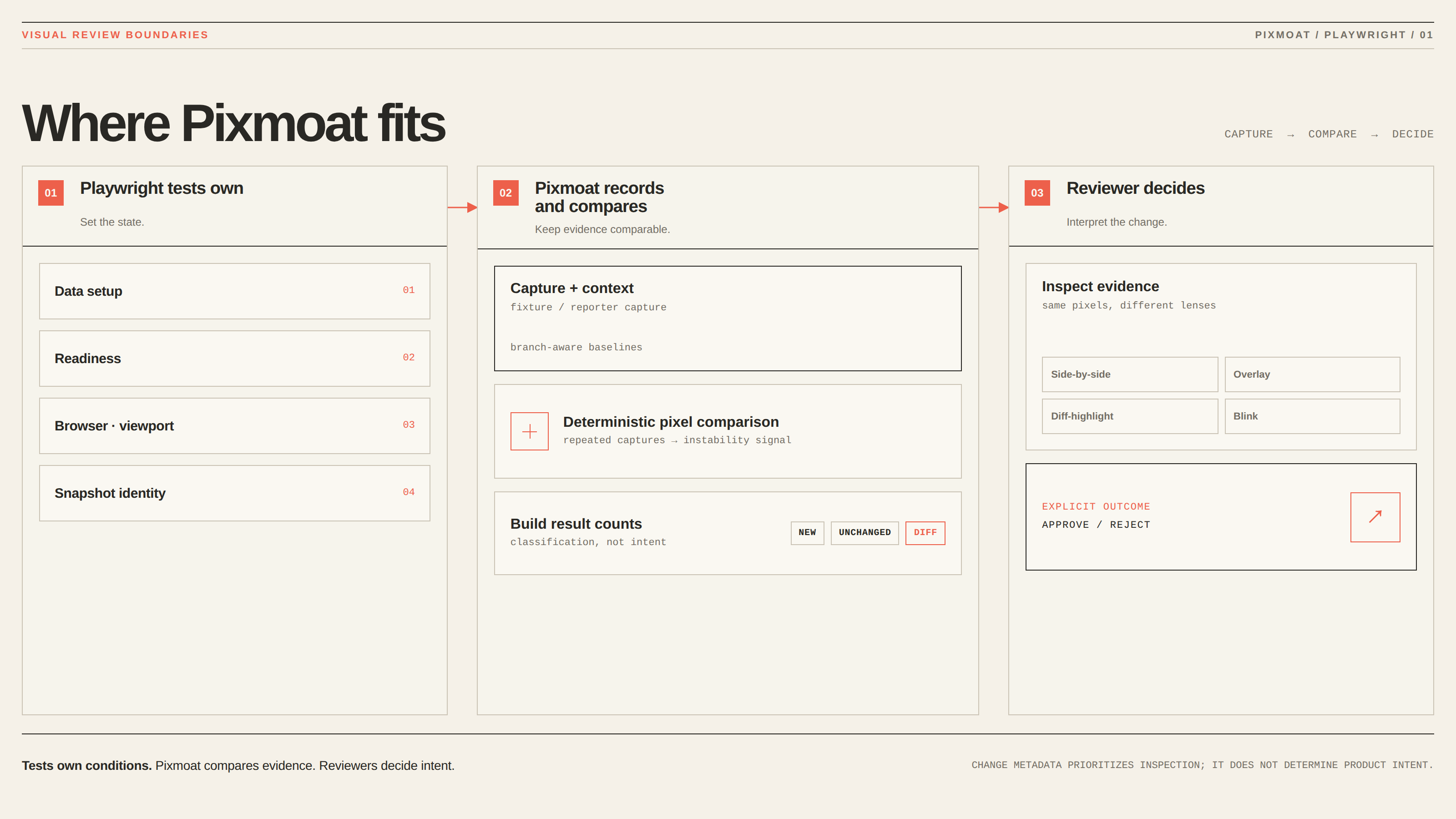
Pixmoat is a Playwright-first, Playwright-only-in-v1 visual review workflow. Its client supports an explicit fixture API and a reporter for existing toHaveScreenshot() tests. Builds record counts such as new, unchanged, and diff, can detect instability through repeated captures, and use branch-aware baselines.
The comparison is deterministic pixel comparison, not AI-powered diffing. Pixmoat’s review workflow provides side-by-side, overlay, diff-highlight, and blink views, along with zoom, pan, keyboard navigation, and explicit approval or rejection decisions. Its deterministic change metadata and grouped review context can reduce repeated inspection, but they do not decide whether a redesign is correct. Your Playwright tests still own data setup, readiness, browser coverage, and snapshot identity.
For an existing suite, the Playwright integration guide covers the fixture and reporter approaches, including the build lifecycle and local verification. If you want the triage policy to be reviewable with the code, the project configuration guide documents settings for blocking mode, tolerance, and flakiness thresholds.
Use the visual-build triage checklist
Before approving a mixed build, ask:
- Are any expected snapshots missing? Resolve capture completeness first.
- Are any results flaky or quarantined? Stabilize the observation before reviewing pixels.
- Are new snapshots intentional and correctly identified? Treat them as coverage decisions.
- Do changed regions match the code and the intended UI outcome? Approve or reject explicitly.
- Are unchanged results being left alone? Do not spend review time proving what already matches.
Use this visual-build triage checklist on your next Playwright build, then share the resulting review rule with the test author. The goal is a shorter queue with better decisions—not a quieter queue achieved by accepting evidence you do not trust.